
This page explains how to add WindowCapture2D to your project and confirm the runtime environment and bundled content.
Install the plugin
WindowCapture2D is available on Fab. Install it into your project from the Fab listing page.
Open the Unreal Engine library in your Fab library and add WindowCapture2D to the target project. Open the project, open Edit → Plugins from the menu, search for WindowCapture2D, and turn on Enabled.

After confirming it is enabled, restart the editor.
Confirm the runtime environment
WindowCapture2D is a Windows (Win64) only plugin. The plugin modules are loaded only on Win64, so it does not run in projects targeting other operating systems. The officially supported OS is Windows 11.
The prebuilt plugin installed from Fab requires no additional external libraries or project settings.
When building the plugin from source, Windows SDK v10.0.22000.0 or later is required. The WinRT (cppwinrt) headers used for capturing are bundled with the plugin, so nothing extra needs to be installed on your environment.
Confirm the bundled content
The plugin includes Blueprint assets for displaying the captured image. After checking Show Plugin Content in the Content Browser’s Settings menu, WindowCapture2D Content appears in the tree view.
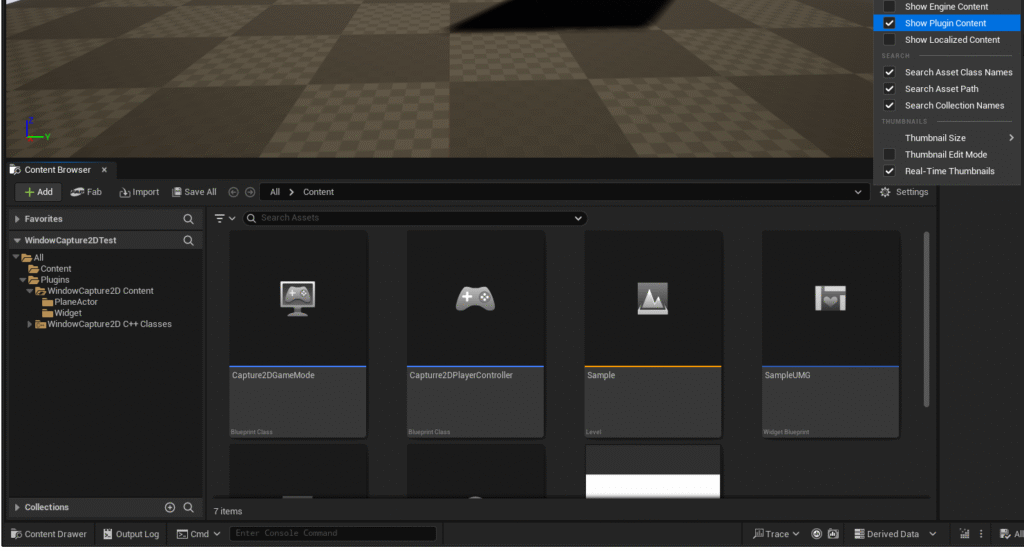
The main assets inside WindowCapture2D Content are as follows.
| Folder | Asset | Content |
|---|---|---|
PlaneActor |
WindowCapturePlane |
Blueprint Actor for capture display placed in the level |
PlaneActor |
WindowCapturePlaneMesh, WindowCaptureMat, WindowCaptureDefaultTex |
Plane mesh, material, and default texture |
Widget |
WindowCaptureUMG |
Blueprint Widget for capture display placed in UMG |
Widget |
WindowCaptureUMGMat, WindowCaptureUMGDefaultTex |
Material and default texture for the widget |
When to use WindowCapturePlane or WindowCaptureUMG is described in Usage.
Check the behavior
If you want to confirm the plugin behavior before purchasing, download the free Tester app from the downloads page. The Tester app runs the same capture feature as WindowCapture2D as a Windows application, so you can check whether the window you want to capture can be captured correctly.
Next steps
- Check the three output methods,
WindowCapturePlane,WindowCaptureUMG, andCaptureMachine, in Usage. - Check the title matching rules and monitor selection in Capture Settings.