
This page covers implementation patterns by goal. Node inputs, outputs and events are listed in the Blueprint API Reference.
Pick the feature that matches your goal first.
| Goal | Feature to use | Edition |
|---|---|---|
| Connect to an existing QUIC server | Create Client and Connect |
Free / Full |
| Connect Unreal Engine instances to each other | Client and server together | Full Edition |
| Send the latest value at a short interval | Datagrams (RFC 9221) | Full Edition |
| Send data with no gaps, in order | Bidirectional or unidirectional streams | Free / Full |
| Reconnect to the same destination | Reconnect (with datagrams, create the endpoint again too) |
Free / Full |
| Receive a stream the peer opened | On Stream Started By Peer |
Free / Full |
Connect to an existing QUIC server as a client
Use this pattern to talk to your own server that runs on QUIC, the transport HTTP/3 is built on. The plugin covers QUIC transport only; it does not include HTTP/3 framing or the h3 ALPN.
- Starting nodes:
Create Client→Configure→Connect - Keep: the
Clientvariable and each openedStreamvariable - Send:
Sendon the stream - Receive:
On Data Receivedon the stream - Completion:
On Connectedfor the connection,On Closedfor the stream - Shutdown:
CloseorAbort→Disconnect→Shutdown
Check which ALPN the server accepts. If the values differ, the connection is never established. Set Alpn in Configure to the same value the server uses.
In production set Validation Policy to SystemTrust, and make sure the server certificate can be validated against the system trust store.
Connect Unreal Engine to Unreal Engine (Full Edition)
The features in this section are a Full Edition feature. Both the server side and the client side are built in Blueprint.
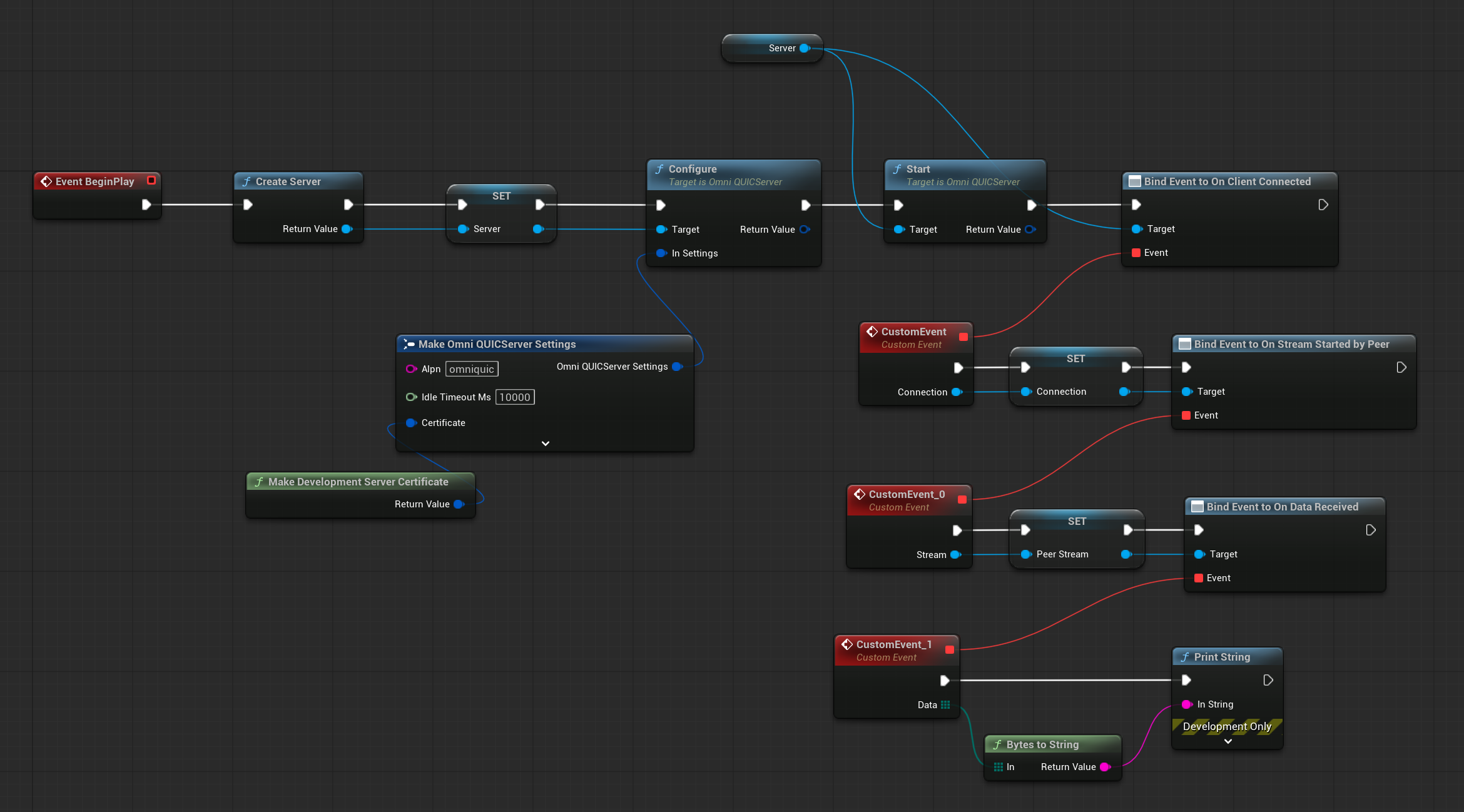
- On the server Actor, call
Create Serverand keep it in a variable. - Set ALPN, port and certificate in
Configure, then callStartto begin listening. - Keep the
Connectiondelivered byOn Client Connected. - To send from the server, call
Open Bidirectional StreamorOpen Unidirectional Streamon thatConnection. - On the client,
Create ClientandConnect, then open a stream fromOn Connected. - Streams opened by the peer arrive in
On Stream Started By Peer.
- Keep: the
Servervariable, anyConnectionyou still need, and each openedStream. - Connection limit:
Max Connectionsof0means no limit. With1or more, further clients are reported throughOn Client Rejected. - Shutdown: close each stream, call
Disconnecton the connection, callStopon the server, thenShutdown.
Get Connections returns a snapshot of the connections that are live at that moment. To keep a connection, store the Connection from On Client Connected in a variable.
Synchronise state with datagrams (Full Edition)
The features in this section are a Full Edition feature. Datagrams suit data where an older value arriving late does no harm and low latency matters more than delivery, such as positions and input.
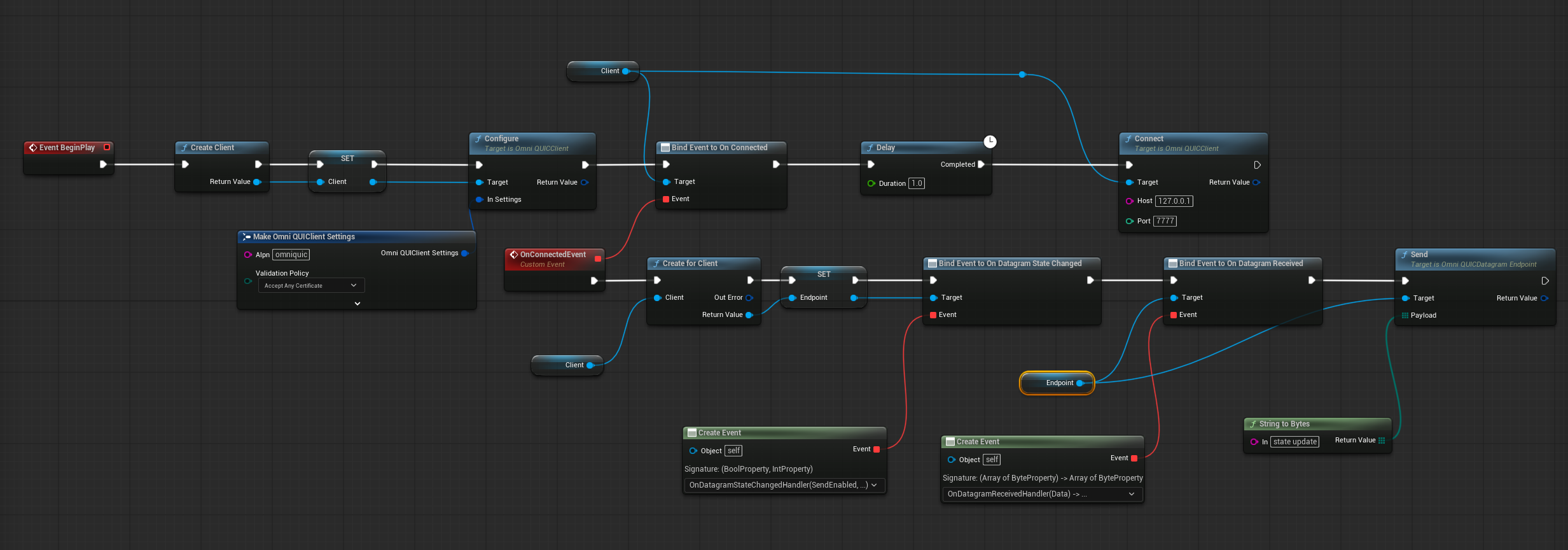
- After the connection is established, call
Create For Client(orCreate For Server Connectionon the server side) and keep the result in a variable. - Bind
On Datagram Receivedand interpret the receivedData, for example withBytes To String. - Use
On Datagram State Changedto learn when sending is possible and what the maximum size is. - To send, pass a byte array to
Send.
| Property | Behaviour |
|---|---|
| Reliability | None. A datagram may never arrive |
| Ordering | None. Arrival order is not the send order |
| Maximum size | Get Max Datagram Size. It depends on the path MTU and can change while the connection lives |
| Oversized payload | Fails with DatagramTooLarge. The payload is never split or truncated |
| Peer without support | Fails with DatagramNotSupportedByPeer. There is no automatic switch to a stream |
| Reception | Always on for every connection in the Full Edition. Datagrams that arrive before the endpoint exists are discarded |
The endpoint belongs to one connection generation. After Reconnect, call Create For Client again and rebind the delegates. Every Send from the old endpoint fails with NotConnected.
Send large data over streams
Use streams for images, audio, long strings and anything else that must arrive complete and in order.
- Open a stream with
Open Bidirectional StreamorOpen Unidirectional Stream. - Pass
String To Bytesoutput, or bytes read from a file, toSend. - To signal the end of sending, set
Finish Sendto true on the last payload, or call theFinish Sendnode. - On the receiving side, use
On Data Receivedand detect the end withOn Peer Finished Sending.
| Point | Detail |
|---|---|
| Single send size | Payloads above 4 GiB fail with InvalidArgument |
| Empty payload | With Finish Send false, an empty array fails with InvalidArgument |
| Received chunks | On Data Received fires per receive event, and bytes are never coalesced |
| Unidirectional peer stream | A unidirectional stream the peer opened is receive-only. Send fails |
When you send large amounts, queue incoming data and process it on the next frame instead of handling everything in one tick. All delegates fire on the GameThread, so a heavy receive handler directly affects frame time.
Reconnect
Use this pattern after a network change or a server restart.
- Check
Get State.Reconnectonly works while the client is connected, so confirm the state isConnected. If it isDisconnected, start again fromConnect. - Call
Reconnect. The Host and Port from the lastConnectare reused. - Handle the end of the old connection in
On Disconnected. - If you use datagrams, call
Create For Clientagain and rebind the delegates. - Open the streams you need on the new connection.
Reconnect does not wait. The old connection’s On Disconnected and the old streams’ On Closed fire around the same time as the new connection comes up, in no guaranteed order. Use Get State, not On Disconnected, to decide whether the client is currently down.
Streams opened before the reconnect cannot be reused. Open new streams and resend any data that was in flight from your own code.
Receive peer-initiated streams
Both the client and the server can receive streams the peer opens.
- Client:
On Stream Started By PeeronClient - Server:
On Stream Started By Peeron eachConnection
Is Peer Initiated is true for the received Stream. A unidirectional stream the peer opened is receive-only: use On Data Received and On Peer Finished Sending to read it, and Close to finish.
The edition does not cap how many streams the peer opens. The cap applies only to streams you initiate.
Trying it on the Free Edition
The Free Edition focuses on the QUIC client.
- The server and datagram sections can only be followed on the Full Edition.
- You can hold two locally initiated streams open per connection. Going past that fails with
StreamLimitReached, and the connection stays up. - The process can hold one active client connection at a time. A second concurrent
Connectfails withConnectionLimitReached. Get Max Concurrent StreamsandGet Max Concurrent Connectionsreport the limits of the running build. Use their return values instead of comparing against a number.- Prepare a QUIC server to connect to.
A Blueprint built on the Free Edition moves to the Full Edition by replacing the plugin. Node and class names are the same.