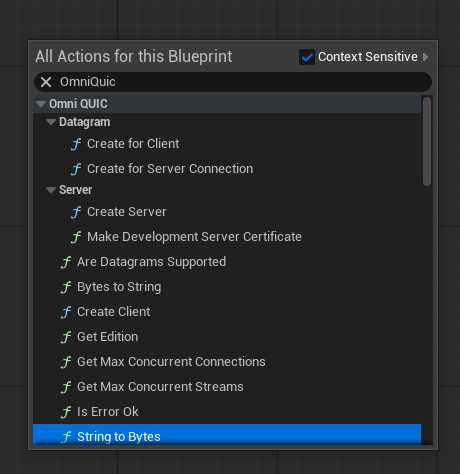
This page lists the Blueprint classes, nodes, events, structs and enums in OmniQUIC. Class names are written as UOmniQUICClient, and the node name shown in Blueprint is given alongside.
Every function and delegate runs on the GameThread only. MsQuic callbacks pass through a thread-safe queue and are delivered on the GameThread, so Blueprint events always fire on the game thread.
Objects returned by Create Client and the other creation nodes must be stored in Blueprint variables. A local variable alone is not enough, and garbage collection destroys the object.
Items marked as a Full Edition feature have no node at all in the Free Edition.
How the API fits together
| Class | What it does | Edition |
|---|---|---|
UOmniQUICBlueprintLibrary |
Creates the client, reports the edition, converts UTF-8 | Free / Full |
UOmniQUICClient |
Connects, disconnects, reconnects, opens streams, reports state | Free / Full |
UOmniQUICServer |
Starts and stops the listener, accepts connections, lists them | Full Edition |
UOmniQUICServerConnection |
Opens streams and disconnects one accepted connection | Full Edition |
UOmniQUICStream |
Sends, finishes, closes and aborts a stream | Free / Full |
UOmniQUICDatagramEndpoint |
Sends and receives datagrams, reports negotiation state | Full Edition |
flowchart TD
  Lib[UOmniQUICBlueprintLibrary] -->|Create Client| Client[UOmniQUICClient]
  Client -->|Open Bidirectional / Unidirectional Stream| Stream[UOmniQUICStream]
  Client -->|Create For Client| DG[UOmniQUICDatagramEndpoint]

  Server[UOmniQUICServer] -->|On Client Connected| Conn[UOmniQUICServerConnection]
  Conn -->|Open Bidirectional / Unidirectional Stream| Stream
  Conn -->|Create For Server Connection| DG

  Stream -->|On Data Received| BP[Blueprint events]
  DG -->|On Datagram Received| BP
UOmniQUICBlueprintLibrary
These are the shared nodes that appear when you right-click in a Blueprint graph and search for OmniQUIC. Both editions have them under the same names.
Create Client
Creates a QUIC client object. The return value is a UOmniQUICClient. Store it in a Blueprint variable.
When World Context Object is empty, the object is created in the transient package. Either way, garbage collection destroys it unless a variable holds it.
Get Edition
Returns the edition of the running build, either Free or Full.
Get Max Concurrent Streams
Returns how many locally initiated streams one connection may hold open at once. The Free Edition returns 2; the Full Edition returns a large value that stands for unlimited.
The value differs between editions, so use this node instead of comparing against a number in Blueprint.
Get Max Concurrent Connections
Returns how many client connections the whole process may hold at the same time. The Free Edition returns 1; the Full Edition returns a large value that stands for unlimited.
Only active connections count. A connection whose disconnect has started is released immediately, so close-then-reconnect — including Reconnect — always works in the Free Edition. The value differs between editions, so use this node instead of comparing against a number in Blueprint.
Are Datagrams Supported
Returns whether this build supports datagrams: true in the Full Edition, false in the Free Edition.
It is a hint for switching UI. The Free Edition has no datagram nodes at all, so a Blueprint that uses them cannot compile there.
Is Error Ok
Returns whether the Code of an FOmniQUICError is None. Use it to test the result of any failing call.
FOmniQUICError is a struct, and a struct cannot carry a callable function of its own. This static node is the Blueprint entry point for that check.
String To Bytes
Converts a string to UTF-8 bytes. Both Send nodes take byte arrays, so use this when you send text.
Bytes To String
Converts UTF-8 bytes back to a string. Use it to display received data. Invalid byte sequences are replaced with U+FFFD, and the conversion itself never fails.
UOmniQUICClient
Configure
Validates and stores the client settings. Call it once before you create a connection. It can be called again whenever no connection exists.
The argument is FOmniQUICClientSettings. An empty ALPN, an ALPN above 255 bytes, a negative idle timeout, a negative keep-alive interval, a keep-alive interval above 4294967295, or a negative receive backpressure value fails with InvalidArgument.
Connect
Starts a connection attempt. The work is asynchronous, and On Connected reports completion.
| Pin | Meaning |
|---|---|
Host |
Destination host name or IP address |
Port |
Destination UDP port, 1 to 65535 |
| Return | FOmniQUICError |
A port outside the range fails with InvalidArgument. Calling without Configure, or while a connection already exists, fails with InvalidState. When the edition’s concurrent connection budget is used up — in the Free Edition, when another active connection exists anywhere in the process — it fails with ConnectionLimitReached before anything is started.
Disconnect
Starts a graceful disconnect and does not wait. On Disconnected reports completion. The old connection is retired immediately, so its events cannot be confused with a later connection.
Reconnect
Replaces the live connection with a fresh one, using the Host and Port from the last Connect. It does not wait.
It fails with InvalidState when Configure has not been called or no connection is established. The old connection’s On Disconnected and the old streams’ On Closed fire around the same time as the new connection comes up, in no guaranteed order. Check Get State for the current state.
Shutdown
Waits until every handle is closed. Pending end-of-life events fire during this call. The object cannot be used afterwards, and later calls fail with InvalidState. It also runs automatically when the object is destroyed.
Get State
Returns the current connection state: Disconnected, Connecting, Connected or Disconnecting.
Get Remote Address
Returns the address of the connected peer, or an empty string when there is no connection.
Open Bidirectional Stream
Opens a bidirectional stream that this endpoint initiates. The return value is FOmniQUICStreamOpenResult, which carries Stream and Error.
This node is not pure. A pure node is re-evaluated once per connected pin, and every open reserves a stream slot, so a pure open would leak slots.
Without a connection it fails with NotConnected. On the Free Edition, once the per-connection stream budget is used up, it fails with StreamLimitReached.
Open Unidirectional Stream
Opens a unidirectional stream that this endpoint initiates. The return value and failure conditions match the bidirectional open. A unidirectional stream only sends from this endpoint.
On Connected
Fires once when the connection is established. It does not fire when the connection fails. To detect failure, check Get State or watch the state with a timeout of your own.
On Disconnected
Fires when the connection ends. Reason carries the FOmniQUICError that explains the disconnect. It also fires when you call Disconnect yourself.
Right after Reconnect, it can fire for the previous connection. To answer “is the client connected right now”, use Get State.
On Stream Started By Peer
Fires when the peer opens a stream. The Stream argument carries the events for receiving data and for the end of the stream.
UOmniQUICServer
The nodes in this section are a Full Edition feature.
Create Server
Creates a QUIC server object. This is a static node on UOmniQUICServer. Store the return value in a Blueprint variable.
Make Development Server Certificate
Returns the settings that load the bundled development certificate. Windows uses a .pfx file; Mac uses a PEM certificate and private key pair. It is for development only and must not be used in production.
Configure
Validates and stores the server settings. Call it once before Start.
The argument is FOmniQUICServerSettings. It fails with InvalidArgument for an empty or oversized ALPN, a negative idle timeout or connection limit, a port outside 0 to 65535, a certificate file that cannot be read, or a certificate format the current platform cannot load.
Start
Opens the listener and begins accepting connections on all IPv4 interfaces. Accepting is asynchronous. Start can be called again after Stop.
Stop
Closes the listener and retires the accepted connections. It does not wait.
Shutdown
Closes the listener, every connection, the configuration and the registration. It waits until every handle is closed, and pending end-of-life events fire during this call. The object cannot be used afterwards.
Is Listening
Returns whether the listener is currently listening.
Get Listen Port
Returns the UDP port the listener is bound to. It returns 0 before Start and when the platform reports no port. If you set Port to 0, read the assigned port from this node.
Get Connections
Returns the connections that are accepted and not yet disconnected, as an array of UOmniQUICServerConnection.
This is a pure node: it is re-evaluated once per connected output pin and allocates a fresh array each time. To keep a connection, store the Connection from On Client Connected in a variable.
On Client Connected
Fires when a client is accepted. The Connection argument carries the stream and disconnect events for that connection.
On Client Disconnected
Fires when an accepted connection ends. The Connection argument is the object that ended.
On Client Rejected
Fires when a connection is refused, either because Max Connections is reached or because the server is stopping.
UOmniQUICServerConnection
The nodes in this section are a Full Edition feature. A UOmniQUICServerConnection is the object delivered by On Client Connected. Blueprint cannot create one.
Get Remote Address
Returns the address of the client, in the form 127.0.0.1:52344. It returns an empty string once the connection is gone.
Open Bidirectional Stream
Opens a bidirectional stream from the server side. The return value is FOmniQUICStreamOpenResult. It reserves a stream slot for that connection, so it is not pure.
Open Unidirectional Stream
Opens a unidirectional stream from the server side. A unidirectional stream only sends from the server.
Disconnect
Gracefully disconnects this connection and does not wait. On Disconnected reports completion.
On Stream Started By Peer
Fires when the client opens a stream. The Stream argument carries the events for receiving data and for the end of the stream.
On Disconnected
Fires when this connection ends. Reason explains the disconnect.
UOmniQUICStream
Get Direction
Returns the direction the stream was opened with, Bidirectional or Unidirectional.
Is Peer Initiated
Returns true when the peer opened the stream. A unidirectional stream opened by the peer is receive-only.
Get State
Returns the stream state: Open, SendClosed, Closed or Aborted.
| State | Meaning |
|---|---|
Open |
Both directions are usable |
SendClosed |
This endpoint sent its FIN; a bidirectional stream still waits for the peer |
Closed |
Shut down normally. The stream cannot be used afterwards |
Aborted |
Aborted. The stream cannot be used afterwards |
Send
Sends a byte array on the stream.
| Pin | Meaning |
|---|---|
Data |
Payload to send. String To Bytes builds one from a string |
Finish Send |
When true, send FIN after this payload and finish the send direction |
| Return | FOmniQUICError |
An empty payload with Finish Send false, and any payload above 4 GiB, fail with InvalidArgument. Sending on a unidirectional stream the peer opened fails with InvalidState, and sending on a finished stream fails with StreamClosed.
Finish Send
Sends FIN with no payload. It tells the peer that no more data is coming.
Close
Starts a graceful close and does not wait. On Closed reports completion. A bidirectional stream reaches On Closed only after the peer has finished sending as well.
Abort
Aborts the stream immediately. On Closed reports completion. Data still in flight may be discarded, so use it to clean up after an error.
On Data Received
Fires for each received chunk. Data holds the bytes from that receive event. Bytes are never coalesced or split.
On Peer Finished Sending
Fires when the peer finished its send direction. No more data will arrive from the peer.
On Closed
Fires once when the stream is fully shut down. The stream cannot be used afterwards.
UOmniQUICDatagramEndpoint
The nodes in this section are a Full Edition feature.
Create For Client
Returns the datagram endpoint of a client connection. Call it from On Connected onwards. Asking twice for the same connection returns the same object.
The return value is a UOmniQUICDatagramEndpoint; on failure, Out Error explains why. Without an established connection it fails with InvalidState.
The endpoint belongs to one connection generation. After Reconnect, create it again and rebind the delegates.
Create For Server Connection
Returns the datagram endpoint of a connection accepted by the server. Pass the Connection from On Client Connected, and call it from that point onwards. Asking twice for the same connection returns the same object.
The return value and failure conditions are the same as for Create For Client. The endpoint belongs to one connection generation, so it cannot be used after the connection ends.
Send
Sends one datagram. The argument is a byte array.
There is no reliability and no ordering. The payload is never split or truncated. An empty payload fails with InvalidArgument, a missing connection with NotConnected, a peer without datagram support with DatagramNotSupportedByPeer, and a payload above Get Max Datagram Size with DatagramTooLarge.
Is Peer Datagram Supported
Returns whether the peer accepts datagrams. It returns false while there is no connection and after the connection ends.
Get Max Datagram Size
Returns the currently negotiated maximum payload size. It depends on the path MTU and can change while the connection lives. It returns 0 when the value is unknown and after the connection ends.
On Datagram Received
Fires for each received datagram. Data holds the bytes of that datagram.
On Datagram State Changed
Fires when the negotiated state changes. Send Enabled says whether sending is possible, and Max Send Length is the largest payload this endpoint may send.
It also fires once right after the endpoint is created, with the values at that moment, so a change that happened before creation is still reported. The same value is never delivered twice.
Public structs
FOmniQUICClientSettings
| Field | Description |
|---|---|
Alpn |
Protocol name agreed at connect time. The default is omniquic |
Validation Policy |
SystemTrust or AcceptAnyCertificate |
Receive Backpressure Bytes |
Receive backpressure high-water mark in bytes. While received bytes waiting for the GameThread exceed it, the receive side is paused, and it resumes once delivery brings the total back to half of it. 0 means the 2 MiB default. Values below 64 KiB are raised to 64 KiB |
Idle Timeout Ms |
Idle timeout in milliseconds. 0 keeps the MsQuic default |
Keep Alive Interval Ms |
Keep-alive interval in milliseconds. 0 disables keep-alives: no PING is sent during idle, so a silent connection is bounded by the idle timeout on either side |
FOmniQUICServerSettings
| Field | Description |
|---|---|
Alpn |
Protocol name agreed at connect time. The default is omniquic |
Idle Timeout Ms |
Idle timeout in milliseconds. 0 keeps the MsQuic default |
Receive Backpressure Bytes |
Receive backpressure high-water mark in bytes, applied to every accepted connection. The semantics match the client setting |
Max Connections |
Maximum simultaneous accepted connections. 0 means no limit |
Port |
UDP port to listen on. 0 lets the OS choose |
Certificate |
Certificate settings to use |
FOmniQUICServerCertificate
| Field | Description |
|---|---|
Source |
Pkcs12 File or Pem File Pair |
Certificate File Path |
Absolute path to the .pfx or the PEM certificate |
Private Key File Path |
Absolute path to the PEM private key. Used with Pem File Pair only |
Password |
PKCS#12 password. It is stored in the asset, so never use a production key password here |
FOmniQUICError
| Field | Description |
|---|---|
Code |
Machine-readable failure cause |
Message |
Human-readable detail about the failure |
FOmniQUICStreamOpenResult
| Field | Description |
|---|---|
Stream |
The opened stream, or empty on failure |
Error |
Failure cause. Code is None on success |
Public enums
| enum | Values |
|---|---|
EOmniQUICEdition |
Free / Full |
EOmniQUICValidationPolicy |
SystemTrust / AcceptAnyCertificate |
EOmniQUICConnectionState |
Disconnected / Connecting / Connected / Disconnecting |
EOmniQUICStreamDirection |
Bidirectional / Unidirectional |
EOmniQUICStreamState |
Open / SendClosed / Closed / Aborted |
EOmniQUICServerCertificateSource |
Pkcs12File / PemFilePair |
EOmniQUICErrorCode |
None, InvalidArgument, InvalidState, MsQuicUnavailable, MsQuicCallFailed, CertificateLoadFailed, NotConnected, StreamLimitReached, StreamClosed, ConnectionClosed, DatagramNotSupportedByPeer, DatagramTooLarge, ConnectionLimitReached, ConnectionIdleTimeout |
EOmniQUICErrorCode is append-only: existing values never change. Where to look for each error is listed in Data Types and Production Settings.