
This page covers the settings and operational details to check when you put OmniQUIC into a game or app. For the basic steps, see the Quick Start.
Data (byte arrays and UTF-8)
Streams and datagrams both carry byte arrays (TArray<uint8>). To send text, convert it to UTF-8 bytes first.
| Conversion | Node | Used for |
|---|---|---|
| String to bytes | String To Bytes |
Passing text to Send on a stream or a datagram |
| Bytes to string | Bytes To String |
Displaying or comparing received data |
Bytes To String replaces invalid UTF-8 with U+FFFD. The conversion itself never fails, so corrupted data shows up as garbled text.
| Constraint | Detail |
|---|---|
| Single send size | Payloads above 4 GiB fail with InvalidArgument |
| Empty payload | Send fails when Data is empty and Finish Send is false |
| Receive granularity | One call per receive event. Bytes are never coalesced or split |
| Message boundaries | A QUIC stream is a byte stream. You define the message framing yourself |
For structured data, add a header that carries the length or the type, or agree on a fixed layout and convert to bytes. Do not rely on a string terminator when reading.
Certificate policy (client)
Validation Policy in FOmniQUICClientSettings decides how the client validates the server certificate. There are two values.
| Value | Behaviour | Used for |
|---|---|---|
SystemTrust |
Validates against certificates the system trusts | Production. This is the default |
AcceptAnyCertificate |
Skips certificate validation entirely | Connecting to a self-signed development server |
AcceptAnyCertificate does not verify who you are talking to. Use it only against a development server, and use SystemTrust in anything you ship.
SystemTrust validates against the platform’s root store. Android has no system-wide verify paths, so there the plugin validates against the Mozilla root store bundled with it — the same public roots the other platforms read from the OS. Custom root certificates are not supported on any platform; reach a self-signed development server with AcceptAnyCertificate.
With SystemTrust, set Host to the host name written in the certificate. Connecting by IP address can fail the check because the name does not match.
Server certificates and TLS backends
The server’s TLS implementation differs by platform, and so does the certificate format it can load.
| Platform | TLS backend | Certificate format | Source |
|---|---|---|---|
| Windows (Win64) | schannel | PKCS#12 (.pfx) |
Pkcs12File |
| Mac (arm64), Linux, Android, iOS | OpenSSL | A PEM certificate plus a private key | PemFilePair |
Configure fails with InvalidArgument when you give it a format the platform cannot load, such as PemFilePair on Windows or Pkcs12File on Mac, Linux, Android or iOS.
Certificate File Path and Private Key File Path take absolute paths. When a file is missing, Configure fails with InvalidArgument; when it cannot be read or imported, Configure fails with CertificateLoadFailed.
Password is the PKCS#12 password. The value is stored in the asset and ends up in a packaged build, so never put a production key password there.
The development certificate files live in the plugin’s Source/ThirdParty/Certs directory. That directory is not included in a packaged build, so starting a server with the development certificate fails inside a package. Prepare a production certificate and decide how it is delivered with the package.
Development certificate
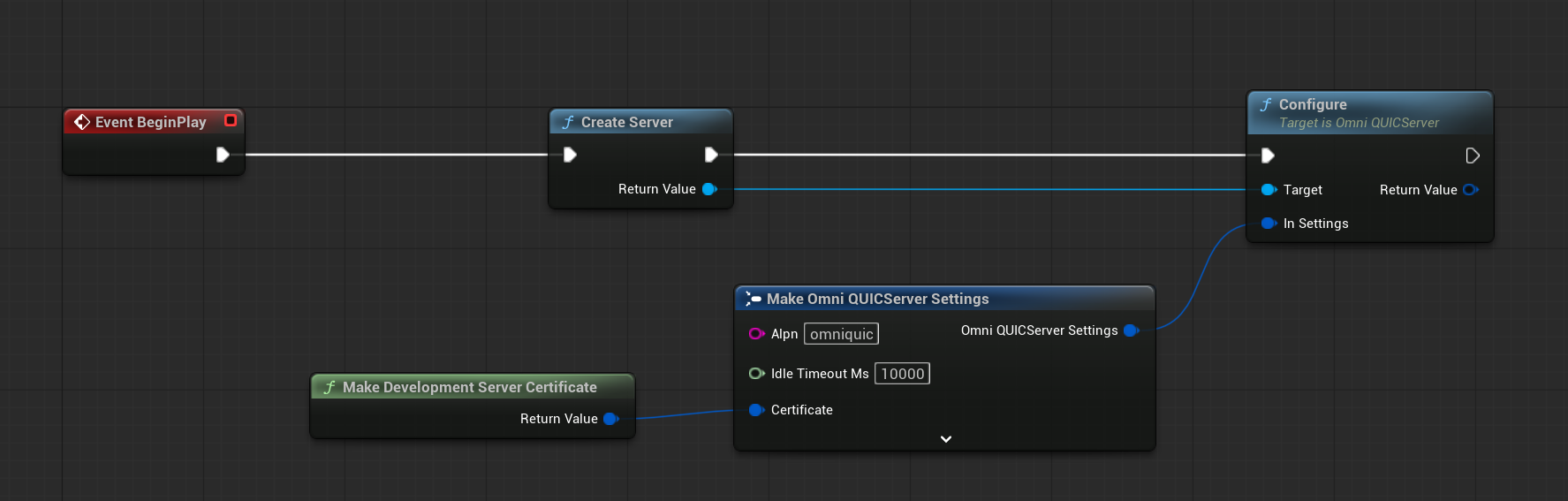
The self-signed certificate for running a server during development is bundled with the plugin distribution package of both editions. Make Development Server Certificate returns the certificate settings for the current platform. The node itself is shipped only in the Full Edition, but the certificate files are also part of the Free Edition distribution package.
| Item | Value |
|---|---|
| Purpose | Development and testing only |
| Common name | CN=OmniQUIC-Dev |
| Subject alt name | localhost, 127.0.0.1 |
| Client side | Connect with AcceptAnyCertificate |
Anyone can obtain this certificate, so never use it for a production server. The development certificate is used by the side that runs the server. Because the Free Edition has no server node, in practice that is the Full Edition. A client uses AcceptAnyCertificate when the destination server presents the same certificate.
Execution model (GameThread only)
Every OmniQUIC function must be called from the GameThread, and every delegate fires on the GameThread.
MsQuic callbacks arrive on worker threads. The plugin hands them to a thread-safe queue, and the module’s tick drains it on the GameThread. Your event handlers therefore never deal with threads, but keep the following in mind.
- Call from
BeginPlay,Tick, timers or button handlers — anywhere that already runs on the game thread. - A heavy receive handler costs frame time directly. When you expect a lot of data, queue it and process it on the next frame.
- Events can arrive on a later tick rather than immediately after the call. Do not build logic that expects a receive event right after
Send.
Object lifetime and retention
Objects returned by Create Client, Create Server, Create For Client and Create For Server Connection must be stored in Blueprint variables. A local variable alone is not enough, and garbage collection destroys the object.
| Object | How to keep it |
|---|---|
| Client | A Blueprint variable or an Actor member variable for as long as the connection is used |
| Server | A Blueprint variable while the listener runs |
| Server connection | Store the On Client Connected value in a variable if you need it after the disconnect |
| Stream | Store the open result in a variable while you keep sending |
| Datagram endpoint | Store it while you send and receive. Create a new one after Reconnect |
Streams are also referenced by the connection that carries them while the connection lives. Once the connection ends, its streams pass through On Closed and become collectable.
A delegate bound to an object that garbage collection destroys simply stops firing. There is no error and no warning, so when events stop arriving, check that a variable still holds the target object.
Get Connections is a pure node: it is re-evaluated once per connected output pin and returns a new array each time. Copy the list into a variable when you need it later.
A datagram endpoint belongs to one connection generation. After Reconnect, every Send from the old endpoint fails with NotConnected.
Stream lifecycle
| Operation | Send direction | Receive direction |
|---|---|---|
Send |
Sends data | Unaffected |
Send with Finish Send true |
Sends data, then FIN | Unaffected |
Finish Send |
Sends FIN with no payload | Unaffected |
Close |
Finishes sending | Waits for the peer, then On Closed |
Abort |
Aborts immediately | Aborts immediately, then On Closed |
Close is a graceful end and Abort is an interruption. Use Abort to clean up after an error, and Close when the data was sent completely. On Closed fires exactly once either way.
Error codes
Every failing call returns an FOmniQUICError. Test whether Code is None with Is Error Ok, and branch on Code when it is not. Message carries the name of the failing operation and further detail.
| Code | Meaning | Where to look |
|---|---|---|
None |
Success | − |
InvalidArgument |
A parameter is invalid: ALPN, port, size, path, and so on | Settings and payload |
InvalidState |
The call is not allowed in the current state | Get State, the order of calls |
MsQuicUnavailable |
The MsQuic API table is not open | Module loading |
MsQuicCallFailed |
An MsQuic call failed | The call name and status inside Message |
CertificateLoadFailed |
A certificate file could not be read | Path, format, file access |
NotConnected |
There is no connection | Connection state, endpoint after Reconnect |
StreamLimitReached |
The locally initiated stream budget is used up | How many streams are open |
StreamClosed |
The stream is already finished | Get State |
ConnectionClosed |
The connection is already gone | On Disconnected, Get State |
ConnectionLimitReached |
The edition’s concurrent connection budget is used up | How many clients hold a connection |
ConnectionIdleTimeout |
The connection was closed by the QUIC idle timeout. A normal end, not a failure; delivered as the Reason of On Disconnected |
Idle Timeout Ms, keep-alive settings |
DatagramNotSupportedByPeer |
The peer does not support datagrams | Is Peer Datagram Supported |
DatagramTooLarge |
The payload exceeds the negotiated maximum size | Get Max Datagram Size |
Error code values are append-only. In Blueprint, do not show the code as a string to players; write a message per code you handle.
Troubleshooting
| Symptom | What to check |
|---|---|
| The connection never comes up | Host and Port, the server state, the UDP port, matching ALPN |
MsQuicUnavailable is returned |
Whether the OmniQUIC module loaded: check the Output Log at startup |
| Certificate validation fails | The choice of SystemTrust or AcceptAnyCertificate, Host against the certificate name, the clock |
CertificateLoadFailed is returned |
The certificate path, the format for this platform, the password |
StreamLimitReached is returned |
The Free Edition allows two locally initiated streams. Close the ones you no longer need |
ConnectionLimitReached is returned |
The Free Edition allows one active connection per process. Multiple PIE clients need the Full Edition |
DatagramNotSupportedByPeer is returned |
Whether the destination supports datagrams. There is no automatic switch to a stream |
DatagramTooLarge is returned |
The value of Get Max Datagram Size; it changes with the path MTU |
| Events stop firing | Whether a variable still holds the object the delegate is bound to |
| The server does not start inside a package | The development certificate is not packaged. Provide a production certificate |
Port 7777 cannot be opened |
Whether another process holds the same UDP port |
Get Connections changes on every read |
The node is pure and re-evaluated. Read it where you need it and copy the array |
Datagrams fail after Reconnect |
Call Create For Client again and rebind the delegates |
When something goes wrong, record the Code and Message from Is Error Ok, Get State, the Host and Port, and the ALPN. Do not put certificate contents or private keys into logs or screenshots.
Security checklist
SystemTrustis used in anything you shipAcceptAnyCertificateis used only against a development server- Production certificate and key passwords are not stored in Blueprint defaults or assets
- The development certificate is not used by a production server
- Received data is validated, and a size limit is decided
- Datagram handling assumes lost and reordered messages
- The host name used to connect matches the certificate