
This page explains YAML reading and writing techniques by goal. For the inputs/outputs of each node, see the Blueprint API Reference.
Selection table by goal
| Goal | Nodes to use | Where to read |
|---|---|---|
| Load YAML from a string | Load Yaml From String |
Quick Start |
| Load YAML from a file | Load Yaml From File |
Loading a configuration file |
| Read a deeply nested value directly | Read Int and the other Read nodes + access strings |
How to write access strings |
| Get an intermediate map in one piece | Read Object / Read Objects |
Getting objects |
| Create, edit, and save YAML | Create Empty Yaml Object + Write nodes + Save Yaml To File |
Creating save data and saving it |
| Read grid-like multi-dimensional data | Access string matrix[1][2] |
Reading multi-dimensional sequences |
| Write or test null values | Write Null / Has Path + Read Value |
Working with null |
How to write access strings
Reading and writing both address their target with an access string (the Access String pin).
Simple cases
A top-level value is addressed by its key as-is. The access string for prop in the following YAML is prop.
prop: abcNested maps
Join keys with dots to walk the hierarchy. prop inside obj in the following YAML is addressed as obj.prop.
obj:
  prop: abc
Documents containing sequences
Sequence elements are addressed with an index in [ ]. In the following YAML, the prop of the first element is obj[0].prop and of the second obj[1].prop. Indices are zero-based.
obj:
  - prop: abc
  - prop: def
Multi-dimensional sequences
Stack [ ] brackets for sequences inside sequences. In the following matrix, matrix[0][0] is 1, matrix[1][2] is 6, and matrix[2][1] is 8.
matrix:
  - [1, 2, 3]
  - [4, 5, 6]
  - [7, 8, 9]
Maps and sequences combine freely: paths such as users[0].contacts[1].values[0] are valid.
Documents whose root is a sequence
When the YAML root is a sequence rather than a map, prefix the path with an index, as in [0].name.
- name: Alice
  age: 30
- name: Bob
  age: 25
Here [0].name is Alice and [1].age is 25.
When the addressed path does not exist, the Read nodes return the Default Value instead of erroring. This behavior lets omitted keys in a configuration file fall back to default values.
Keys that themselves contain . or [ ] cannot be addressed with dot notation. Access such keys from C++ via GetRootNode and FindChild.
Loading a configuration file
A typical example of managing game settings in a YAML file. Place Data/GameConfig.yaml under the Content directory.
player:
  name: Hero
  level: 10
maxPlayers: 4
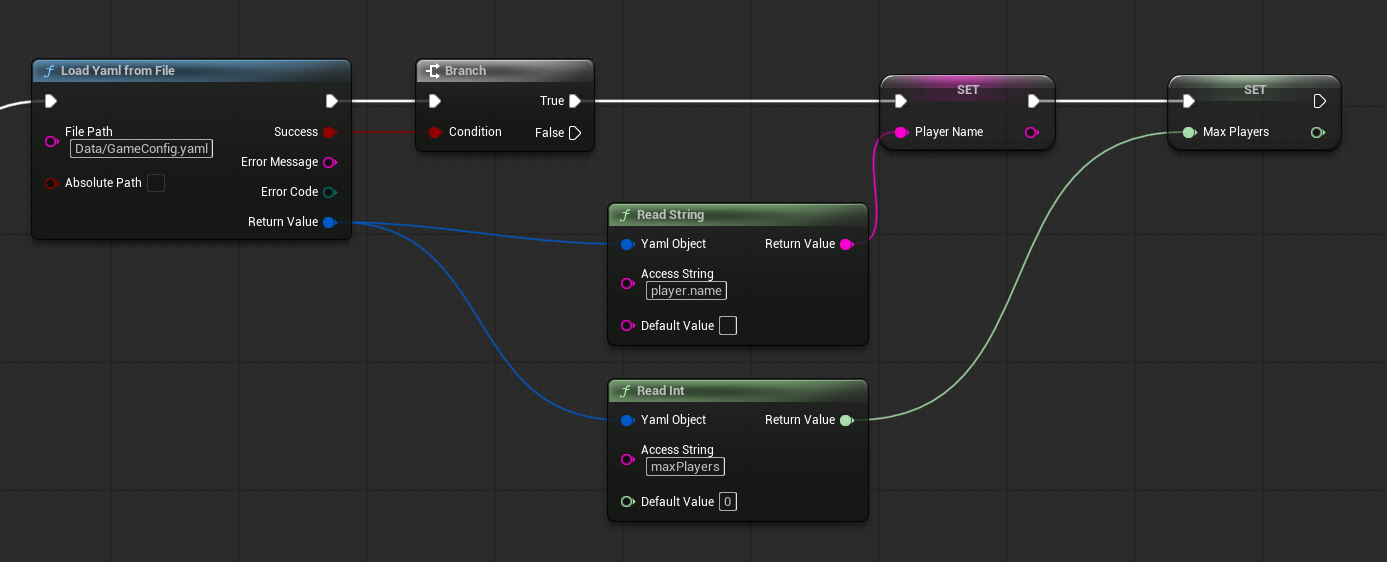
Use the Load Yaml From File node.
| Pin | Value |
|---|---|
| File Path | Data/GameConfig.yaml |
| Is Absolute | off |
When File Path is relative, it is resolved against the Content directory. To read a file outside the project, turn Is Absolute on and specify a full path.
Store the loaded Yaml Object in a variable and read values with Read String (player.name) and Read Int (maxPlayers).
YAML supports comments, which keeps hand-edited configuration files readable. Note, however, that comments are lost if you load and re-save the file (see Current limitations).
When a packaged game reads files inside Content, check that the files are included in the package (additional settings for non-asset files) on the project side.
Getting objects
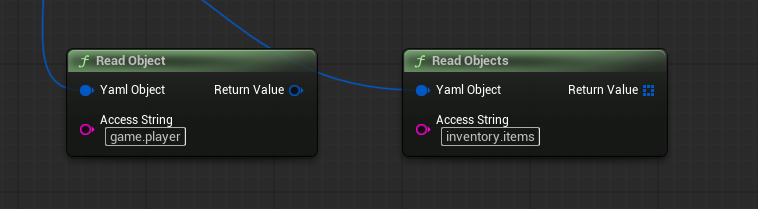
Read Object and Read Objects retrieve YAML maps as Yaml Object values instead of scalar values.
Read Objectreturns the map addressed by the access string. You can then keep reading from the returned object with access strings relative to it — for example, fetch thegamemap and then readplayer.namefrom it.Read Objectsreturns a sequence of maps at once. Use it with aFor Each Loopto process sequences whose elements are maps, such asinventory.items.
Both return independent copies: writes to the original Yaml Object after the call never affect the objects you already obtained.
Creating save data and saving it
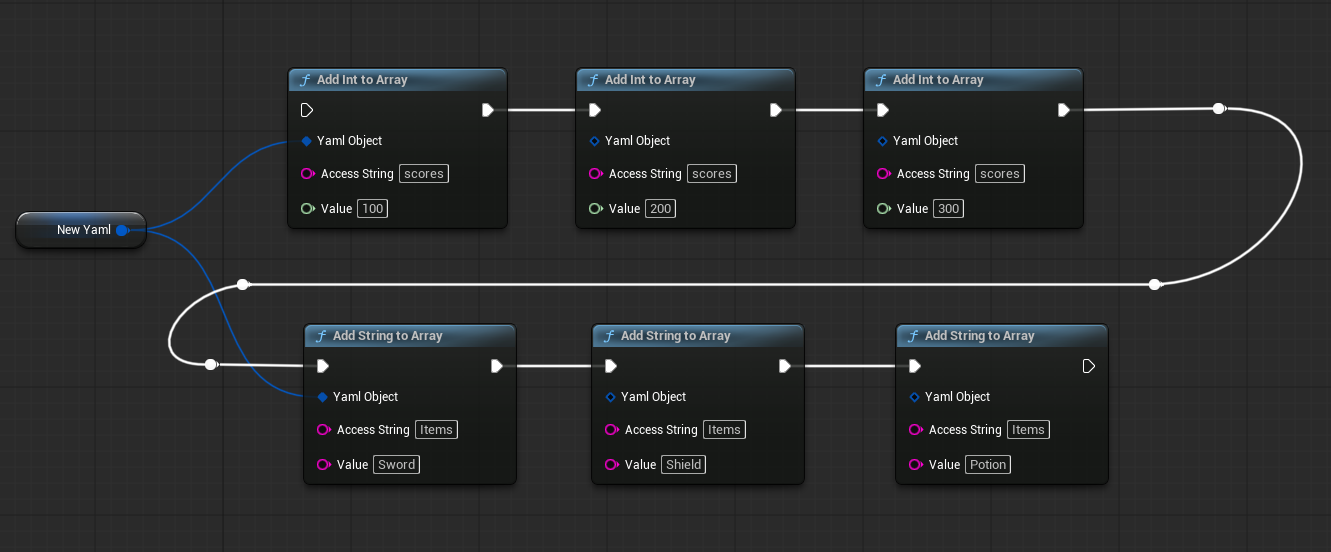
An example of assembling in-game data as YAML and saving it to a file.
- Store the return value of
Create Empty Yaml Objectin a variableNewYaml. - Write scalar values with
Write Int,Write Float,Write String, andWrite Bool. - Embed a separately built
Yaml ObjectwithWrite Objectto create a hierarchy. - Append to sequences with
Add Int To Array,Add String To Array,Add Object To Array, and so on. The sequence is created automatically at the specified path. - Save with
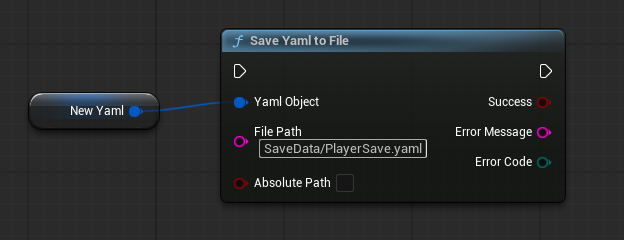
Save Yaml To File.
Specifying a relative path such as SaveData/PlayerSave.yaml in the File Path of Save Yaml To File saves the file under the Content directory. Missing output folders are created automatically.
The created YAML can be converted to a string with Yaml To String. The output is always formatted with line breaks and indentation.
Reading multi-dimensional sequences
Two-dimensional data such as game boards and grid maps can be addressed element by element with access strings. Setting matrix[1][2] as the Access String of Read Int reads the value at row 2, column 3 (zero-based).
Sequences of three or more dimensions are addressed by stacking brackets, as in voxel[1][2][3].
Working with null
YAML null is written ~ or null. EasyYamlParser treats null as a value, distinct from “the path does not exist”.
- To write it, use
Write Null. The document explicitly carrieskey: null. - Reading a null with
Read Intand the other typed Read nodes returns theDefault Value. - Check path existence with
Has Path, and check whether the value is null by reading the node type of theYaml Valueobtained throughRead Value— it reportsNullviaGet Node Type.