
This page describes the API EasyYamlParser exposes to Blueprint. The same API is available from C++. For usage examples, see the Use Cases page.
How the API is organized
Every EasyYamlParser Blueprint node is a static function of EasyYamlParserBlueprintLibrary. Data is handled through two structs.
flowchart TB
  FL["EasyYamlParser nodes<br/>(Blueprint Function Library)"] --> YO["Yaml Object struct<br/>(FEasyYamlObject)"]
  FL --> YV["Yaml Value struct<br/>(FEasyYamlValue)"]
YO --> TXT["YAML string / file"]- Yaml Object (
FEasyYamlObject): one YAML document. It is the return value of the Load nodes and the target of the Write nodes. - Yaml Value (
FEasyYamlValue): a single value taken out of a document. Use it when you need to inspect the node type before reading.
The nodes live under the category EasyYamlParser (Load, Create, Read, Write, Array, Save, Convert, Value, Utility).
Creating a Yaml Object
Load Yaml From String
Parses a YAML string into a Yaml Object.
| Pin | Kind | Description |
|---|---|---|
| Yaml String | input | The YAML string to parse |
| Success | output | true when parsing succeeded |
| Error Message | output | The error details on failure. Includes the line and column |
| Error Code | output | The failure category (see Error codes) |
| Return Value | output | The created Yaml Object; an invalid object on failure |
Load Yaml From File
Loads a YAML file into a Yaml Object.
| Pin | Kind | Description |
|---|---|---|
| File Path | input | Path to the YAML file |
| Is Absolute | input | When off, File Path is resolved relative to the Content directory |
| Success | output | true when the file was read and parsed successfully |
| Error Message | output | Error details when the file is missing, unreadable, or fails to parse |
| Error Code | output | The failure category |
| Return Value | output | The created Yaml Object |
Create Empty Yaml Object
Creates an empty Yaml Object. It is a valid object whose root is an empty map — the starting point for building new YAML with the Write nodes.
Reading values
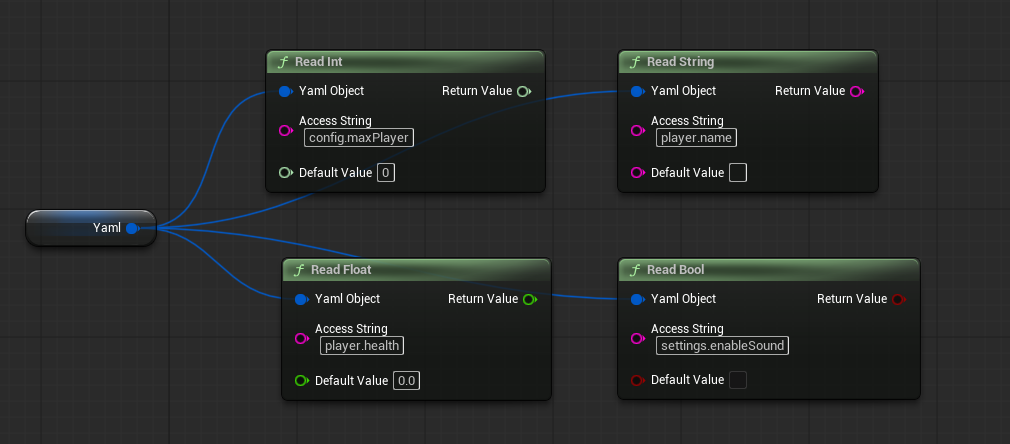
The four nodes Read Int, Read Float, Read String, and Read Bool are pure functions (BlueprintPure) with identical inputs and outputs.
| Pin | Kind | Description |
|---|---|---|
| Yaml Object | input | The Yaml Object to read from |
| Access String | input | The path to read (access strings) |
| Default Value | input | The value returned when the path is missing or the type differs |
| Return Value | output | The read value |
When the value type differs from the node (for example, Read String on a number), the default value is returned. Read Int returns int64 (64-bit) and Read Float returns double precision.
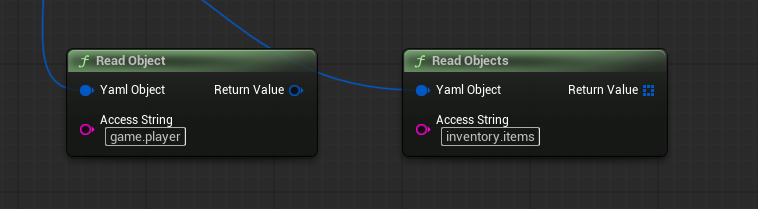
Read Object
Returns the map addressed by the access string as a new Yaml Object. The returned object is an independent copy, and you can read it with access strings relative to its root. When the addressed node is not a map, an invalid object is returned.
Read Objects
Returns the sequence of maps addressed by the access string as an array of Yaml Object. Combine it with a For Each Loop to process each element. Non-map elements are skipped.
Read Value
Returns a snapshot of the node addressed by the access string as a Yaml Value. When the path is missing, an invalid value is returned. Read the value out with the Value nodes after inspecting its type.
Read Array Element / Read Array Values
Read Array Elementreturns theIndex-th element of the sequence at the path as aYaml Value. An invalid value is returned when the path is not a sequence or the index is out of range.Read Array Valuesreturns every element of the sequence at the path as an array ofYaml Value. An empty array is returned when the path is not a sequence.
Get Array Size / Is Array
Get Array Sizereturns the number of elements of the sequence at the path. It returns0when the path is not a sequence.Is Arrayreturns whether the node at the path is a sequence.
Has Path
Returns whether the addressed path exists. A path holding a null value also counts as existing.
Get Root Type
Returns the node type of the document root (Map, Sequence, and so on). Null is returned for an invalid Yaml Object.
Writing values
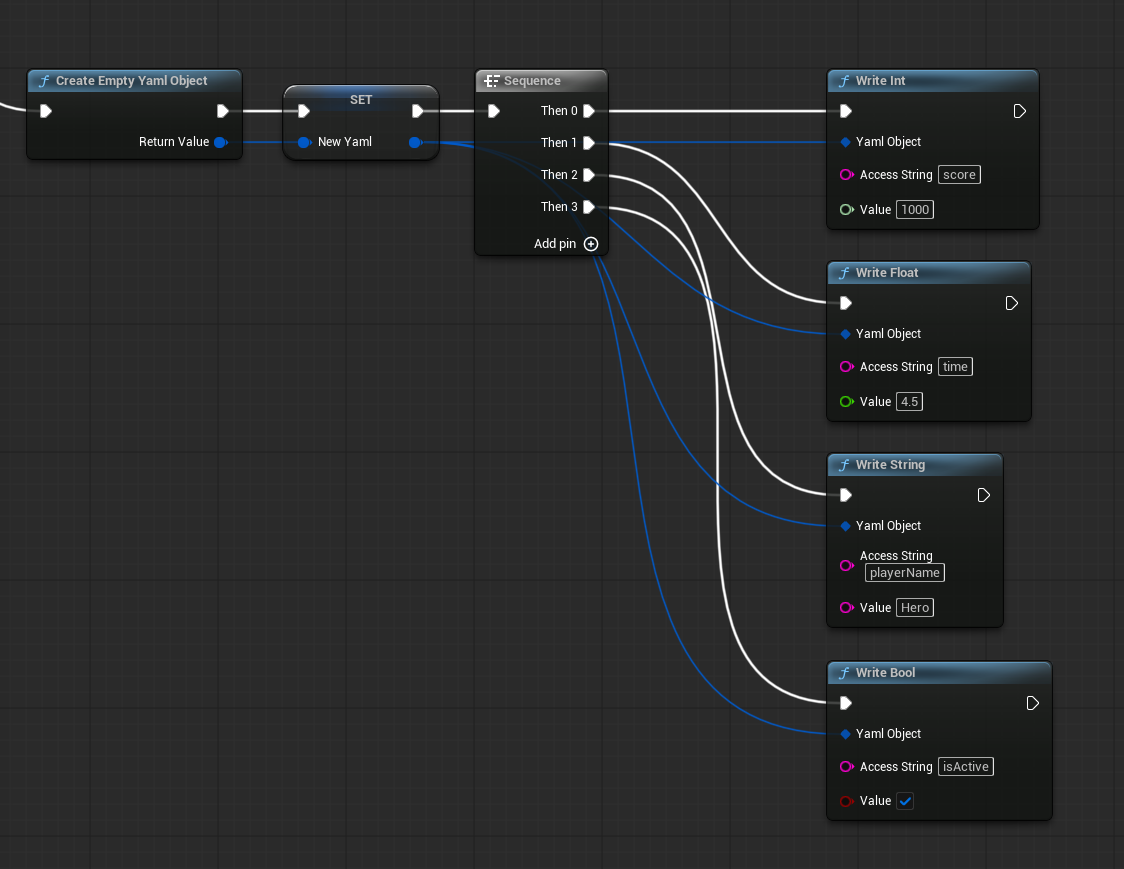
The six nodes Write Int, Write Float, Write String, Write Bool, Write Object, and Write Null all take the Yaml Object pin by reference (UPARAM(ref)). Executing the node updates the connected Yaml Object variable in place.
| Pin | Kind | Description |
|---|---|---|
| Yaml Object | input | The Yaml Object to update (connect a variable) |
| Access String | input | The destination path |
| Value | input | The value to write. Write Object takes another Yaml Object |
When an intermediate map in the access string (such as stats in player.stats) does not exist, the path is created automatically. Embedding another Yaml Object with Write Object assembles hierarchical YAML. Write Null writes an explicit null.
For the fine print of writing (root replacement, the index limit), see Data Types and Production.
Appending to sequences
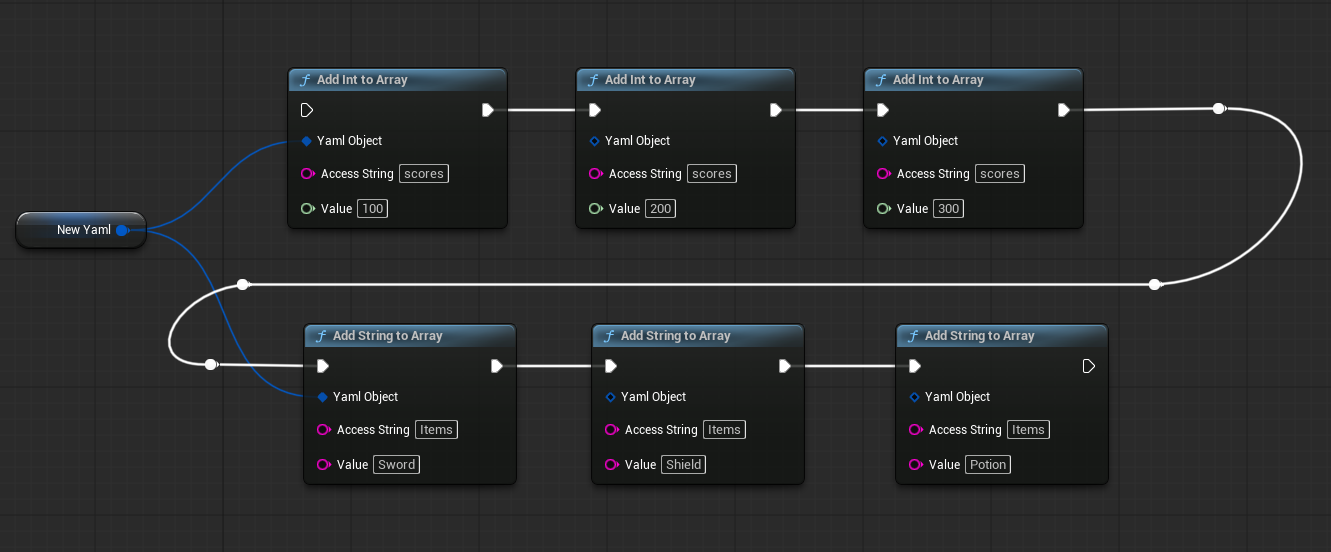
The five nodes Add Int To Array, Add Float To Array, Add String To Array, Add Bool To Array, and Add Object To Array append a value to the end of the sequence at the given path. The Yaml Object pin is passed by reference, like the Write nodes.
When the sequence does not exist at the path, it is created automatically. Existing elements are kept, and each execution appends one element to the end.
Saving and converting
Save Yaml To File
Saves the content of a Yaml Object to a file.
| Pin | Kind | Description |
|---|---|---|
| Yaml Object | input | The Yaml Object to save |
| File Path | input | Destination path. Relative paths resolve against Content |
| Is Absolute | input | Whether to treat File Path as an absolute path |
| Success | output | true when saving succeeded |
| Error Message | output | Error details on failure |
| Error Code | output | The failure category |
Missing output directories are created automatically.
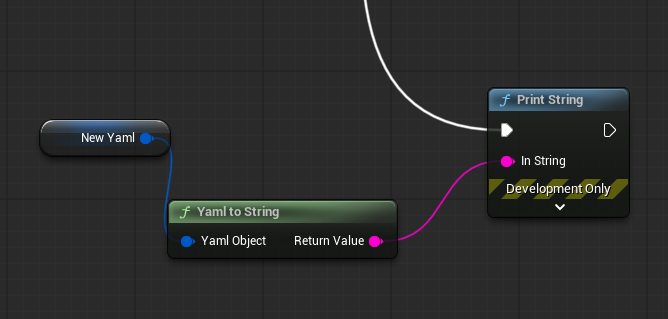
Yaml To String
Converts the content of a Yaml Object to a YAML string. Because YAML expresses hierarchy with indentation, the output is always formatted with line breaks and indentation. An invalid Yaml Object yields an empty string.
Operating on a Yaml Value
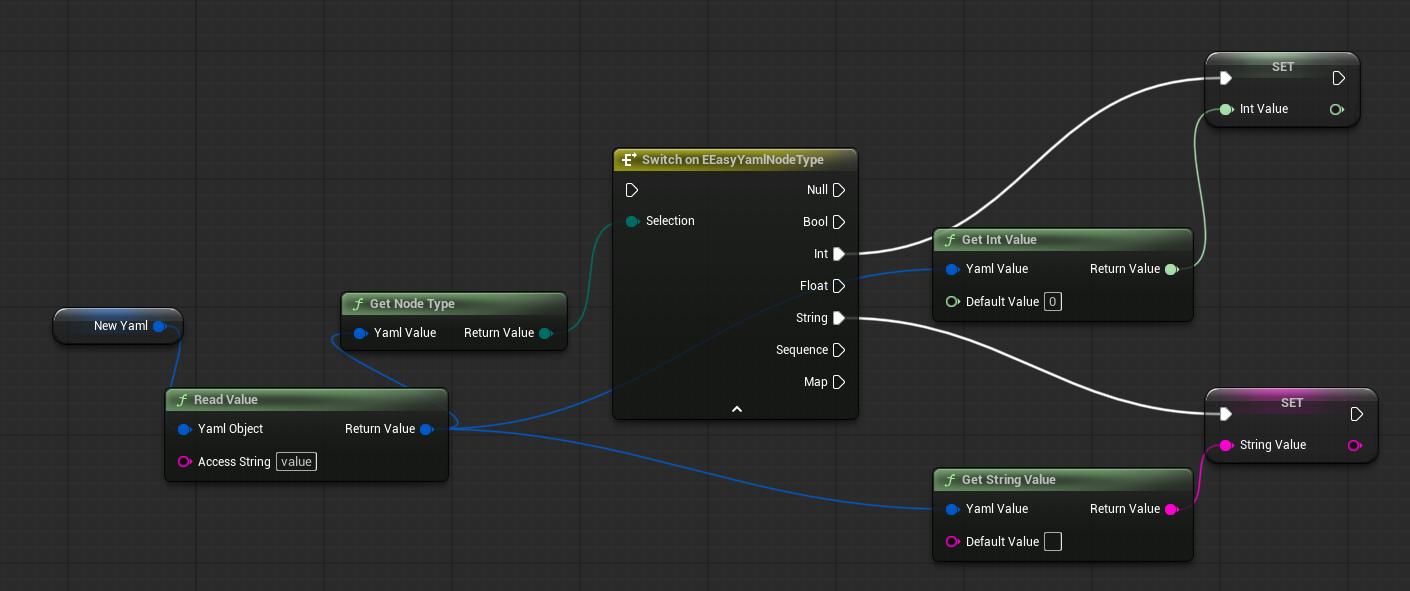
These nodes read values out of the Yaml Value obtained from Read Value, Read Array Element, and Read Array Values.
Get Int Value / Get Float Value / Get String Value / Get Bool Value
Read the value held by a Yaml Value as the given type. The Default Value pin specifies what to return when the type differs or the value is invalid.
Get Int Valuereturns int64 andGet Float Valuereturns double precision.Get String Valuereads string nodes only. Numbers and booleans are not converted implicitly.
Get Node Type
Returns the node type of a Yaml Value as EEasyYamlNodeType — one of Null, Bool, Int, Float, String, Sequence, Map — for comparison and branching.
Is Yaml Value Valid
Returns whether the Yaml Value is valid (whether the path existed). Use Get Node Type to distinguish a null value from a missing one.
Utility
Is Yaml Object Valid
Returns whether a Yaml Object holds a valid YAML document. Use it to check the return value of Load Yaml From String on failure or an uninitialized variable.
Are Yaml Objects Equal
Compares two Yaml Object values for deep equality — types, values, and the map key order. Two invalid objects compare as equal.
Error codes
The Error Code pin of the Load and Save nodes is the EEasyYamlErrorCode enum. Combine it with the Success boolean for branching.
| Value | Meaning |
|---|---|
| None | Success |
| InvalidYaml | A YAML syntax error |
| FileNotFound | The file was not found or could not be read |
| InvalidArgument | An invalid argument (such as saving an invalid object) |
| StructConversionFailed | A USTRUCT conversion failed (C++ API) |
| FileWriteFailed | Writing the file failed |
The Error Message carries a human-readable reason. YAML syntax errors include the position in the line X column Y form.
C++ examples
The same nodes are available from C++ as static functions of UEasyYamlBlueprintLibrary. In addition, FEasyYamlObject (Yaml Object) offers member functions and the USTRUCT conversion API that are C++-only.
#include "EasyYamlParser/EasyYamlBlueprintLibrary.h"
#include "EasyYamlParser/EasyYamlObject.h"

// Loading and reading
bool bSuccess = false;
FString ErrorMessage;
EEasyYamlErrorCode ErrorCode;
FEasyYamlObject YamlObject = UEasyYamlBlueprintLibrary::LoadYamlFromString(YamlString, bSuccess, ErrorMessage, ErrorCode);

if (bSuccess)
{
    // Through the function library
    FString Name = UEasyYamlBlueprintLibrary::ReadString(YamlObject, TEXT("player.name"), TEXT("Unknown"));

    // Through the struct member functions (equivalent)
    int64 Level = YamlObject.ReadInt(TEXT("player.level"), 1);
}

// Creating and saving new YAML
FEasyYamlObject NewYaml = FEasyYamlObject::CreateEmpty();
NewYaml.WriteInt(TEXT("score"), 1000);
NewYaml.WriteString(TEXT("playerName"), TEXT("Hero"));

FEasyYamlResult Result;
NewYaml.TrySaveToFile(TEXT("SaveData/PlayerSave.yaml"), Result);
USTRUCT conversion (C++ only)
FEasyYamlObject provides functions to convert between a YAML document and a USTRUCT instance. They are not available from Blueprint.
// YAML -> USTRUCT (the root must be a map)
FMyConfig Config;
FEasyYamlResult Result;
if (YamlObject.TryReadStruct(Config, Result))
{
    // Every UPROPERTY of Config has been filled in
}

// USTRUCT -> YAML
FEasyYamlObject FromConfig = FEasyYamlObject::FromStruct(Config, bSuccess);
See Data Types and Production for the mapping rules and caveats.
Lifecycle and ownership summary
- A
Yaml Objectis a struct value, but copies share the internal tree. Writes made through one copy are visible from every copy of the sameYaml Object. - The objects returned by
Read Object/Read Objectsare independent deep copies. Later writes to the source document never affect them. - A
Yaml Valueis a snapshot of a node. Later writes to the source document never change it. - The design is USTRUCT-based and never becomes a garbage collection target. No cleanup is required; values are destroyed automatically when they go out of scope.