This page describes the APIs UniversalSerial exposes to Blueprint. The same APIs are available from C++. For guidance on choosing between them, see Use Cases.
API overview
UniversalSerial’s public APIs are consolidated in the Serial Port Manager class (USerialPortManager).
| Role | Nodes |
|---|---|
| Creation and settings | Construct Object from Class, Initialize, and the Set nodes |
| Connection control | Open, Close, IsConnected, Set DTR, Set RTS |
| Sending | Send Data, Send String UTF8, Send String Hex |
| Port discovery | Get Available Serial Ports, Find First Communicable Serial Port |
| Results | Six events including Connected and the Data Received family |
    flowchart TB
	  BP["Blueprint / C++"] --> M["SerialPortManager"]
	  M -->|"Initialize → Open"| OS["OS serial API"]
	  M -->|"Send Data / Send String UTF8 / Send String Hex"| OS
	  OS -->|"receive thread"| M
	  M -->|"Connected / Data Received etc. (game thread)"| BP
Received data is read on a background thread, and receive events are dispatched on the game thread.
Creating a SerialPortManager
Serial Port Manager is a BlueprintType class. Create it with the Construct Object from Class node, specifying Serial Port Manager for Class.
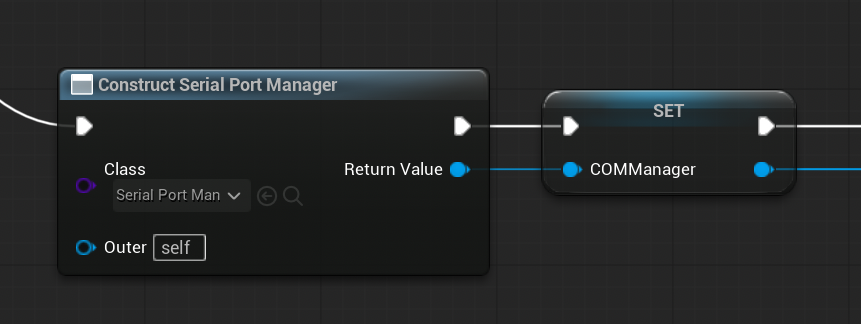
Store the created instance in a member variable. If not stored, it becomes a target for garbage collection and communication cannot continue.
Initialize
Specifies the port name and communication settings. Initialize only stores the settings. To actually open the port, run Open afterwards.
| Input | Default | Description |
|---|---|---|
| Port Name | COM1 | Port name. Formats per platform: see the production page |
| Baud Rate | 9600 | Baud rate. Must match the peer device |
| Data Bits | 8 | Data bits (5-8) |
| Parity | None | Parity bit |
| Stop Bits | 1 | Stop bits |
| Flow Control | None | Flow control |
| Data Format | RawBytes | Receive data format |
| Initial DTR | true | DTR signal state right after the port opens |
| Initial RTS | true | RTS signal state right after the port opens |
The settings must match those of the peer device or software.
Open
Opens the port with the settings stored by Initialize and starts the receive thread. On success the Connected event fires; on failure the Error event fires.
If already connected, the node does nothing and a warning is logged.
Close
Closes the port and stops the receive thread. The Disconnected event fires. Call it when the level ends (EndPlay).
IsConnected
Returns whether the port is open (true: connected, false: disconnected).
Send nodes
| Node | Input | Description |
|---|---|---|
| Send Data | Data (byte array) | Sends the byte array as-is |
| Send String UTF8 | Text, Add Delimiter (default true) | Sends the string as UTF-8. With true, the delimiter is appended to the end |
| Send String Hex | Hex Text | Converts the hexadecimal string to a byte array and sends it. Spaces between bytes are optional |
Sending while disconnected, or sending empty data, does nothing except log a warning.
Set DTR / Set RTS
Toggles the DTR and RTS signal states. Returns true on success. Returns false when not connected.
Set Receive Mode / Get Receive Mode
Specifies how the receive thread polls.
| Receive Mode | Behavior |
|---|---|
| Low | Waits 10 milliseconds when no data arrives |
| Normal | Always waits 1 millisecond |
| High | Waits with Yield instead of sleeping |
High minimizes receive latency but increases CPU usage. Normally use the default Normal. Get Receive Mode returns the current setting.
Set nodes (optional settings)
The following nodes return the manager itself, so you can chain them before Initialize.
| Node | Input | Default | Description |
|---|---|---|---|
| Set Write Timeout | Timeout Ms | 1000 | Write timeout in milliseconds |
| Set Receive Buffer Size | Size In Bytes | 8192 | Receive buffer size (minimum 1024) |
| Set Data Format | Format | - | Changes the receive data format |
| Set String Delimiter | Delimiter | \r\n | Changes the string delimiter |
Get Available Serial Ports
Returns the list of currently available serial port names (BlueprintPure, static). The returned names can be passed directly to Port Name of Initialize.
Find First Communicable Serial Port (and the Binary variant)
Opens candidate ports in order and returns the name of the first communicable port. Returns an empty string when none is communicable. For usage details, see Automatically identify a communicable port in Use Cases.
| Input | Default | Description |
|---|---|---|
| Baud Rate through RTS | - | Communication settings, same order as Initialize |
| Read Timeout Ms | 50 | Read timeout for probing, in milliseconds |
| Write Timeout Ms | 500 | Write timeout for probing, in milliseconds |
| Receive Buffer Size | 4096 | Receive buffer size for probing |
| Probe Command UTF8 | empty | The string sent to each port |
| Expected Response UTF8 | empty | The string that must appear in the response |
| Probe Timeout Ms | 1200 | How long to wait for a response, in milliseconds |
Find First Communicable Serial Port (Binary) probes and verifies with byte arrays (Probe Data and Expected Response). If both probe strings are empty, both variants return the first port that can be opened.
Events
| Event | When it fires | Parameters |
|---|---|---|
| Connected | The port was opened | Serial Port: the manager itself |
| Disconnected | The port was closed | Serial Port: the manager itself |
| Data Received | Data was received | Serial Port, Data: the received byte array |
| Data Received String | A string was received | Serial Port, Data: the received string |
| Data Received Hex | A hex string was received | Serial Port, Hex Data: the hex string |
| Error | An error occurred | Serial Port, Error Message: the error content |
Only the receive event matching the format specified by Data Format (Data Received, Data Received String, or Data Received Hex) is notified. The other two are not notified even when bound.
Enums
| Enum | Values | Purpose |
|---|---|---|
| ESerialPortParity | None / Odd / Even / Mark / Space | Parity bit |
| ESerialPortStopBits | 1 / 1.5 / 2 | Stop bits |
| ESerialPortFlowControl | None / Hardware (RTS/CTS) / Software (XON/XOFF) | Flow control |
| ESerialDataFormat | Raw Bytes (TArray<uint8>) / UTF-8 String / Hex String | Receive data format |
| ESerialPortReceiveMode | Low / Normal / High | Receive thread polling behavior |
C++ example
An example that sends and receives strings with an Arduino. It uses the same elements as the Blueprint setup.
void UMyActor::BeginPlay()
{
    Super::BeginPlay();

    // Create a SerialPortManager and keep it in a member variable
    SerialPort = NewObject<USerialPortManager>();

    // Set up event handlers
    SerialPort->OnConnected.AddDynamic(this, &UMyActor::OnConnected);
    SerialPort->OnDisconnected.AddDynamic(this, &UMyActor::OnDisconnected);
    SerialPort->OnDataReceivedString.AddDynamic(this, &UMyActor::OnDataReceivedString);
    SerialPort->OnError.AddDynamic(this, &UMyActor::OnError);

    // Specify the communication settings (match the peer device)
    SerialPort->Initialize(
        TEXT("COM3"),
        115200,
        8,
        ESerialPortParity::None,
        ESerialPortStopBits::One,
        ESerialPortFlowControl::None,
        ESerialDataFormat::UTF8String,
        true,
        true);

    // Open the port
    SerialPort->Open();
}

void UMyActor::OnConnected(USerialPortManager* SerialPort)
{
    // Send a string (the delimiter is appended automatically)
    SerialPort->SendStringUTF8(TEXT("Hello"), true);
}

void UMyActor::OnDataReceivedString(USerialPortManager* SerialPort, const FString& Data)
{
    UE_LOG(LogTemp, Log, TEXT("Received: %s"), *Data);
}

void UMyActor::OnError(USerialPortManager* SerialPort, const FString& ErrorMessage)
{
    UE_LOG(LogTemp, Error, TEXT("Serial error: %s"), *ErrorMessage);
}

void UMyActor::EndPlay(const EEndPlayReason::Type EndPlayReason)
{
    if (SerialPort)
    {
        SerialPort->Close();
    }
    Super::EndPlay(EndPlayReason);
}
To automatically identify a communicable port, pass the return value of USerialPortManager::FindFirstCommunicableSerialPort to the port name of Initialize before Open.
const FString PortName = USerialPortManager::FindFirstCommunicableSerialPort(
    115200, 8,
    ESerialPortParity::None, ESerialPortStopBits::One, ESerialPortFlowControl::None,
    50, 500, 4096, true, true,
    TEXT("PING\r\n"), TEXT("PONG"), 2000);

if (!PortName.IsEmpty())
{
    SerialPort->Initialize(PortName, 115200, 8,
        ESerialPortParity::None, ESerialPortStopBits::One, ESerialPortFlowControl::None,
        ESerialDataFormat::UTF8String, true, true);
    SerialPort->Open();
}
Deprecated node
| Node | Status |
|---|---|
| Set Read Timeout | Deprecated. Control read timing with Set Receive Mode instead |
It appears with a strikethrough in the Editor. Existing Blueprints that contain it still work, but do not use it in new graphs.
Lifecycle and retention summary
- Keep the
Serial Port Managercreated withConstruct Object from Classin a member variable. - Store the settings with
Initialize, then open the port withOpen. Confirm success or failure with theConnectedandErrorevents. - Sending works only while connected. Sending while disconnected produces a warning log only; no error event fires.
- Only one receive event, matching the
Data Format, is notified, and it runs on the game thread. - Call
Closewhen finished. If the object is destroyed without calling it, the port may remain open.