Table of Contents
A library that makes it easy to switch between various communication methods such as TCP/IP, UDP, shared memory, and file-based communication.
Overview
ObjectDeliverer is a flexible library designed to simplify data communication in Unreal Engine projects.
It allows you to easily switch between various communication protocols such as TCP/IP, UDP, WebSocket, shared memory, and file transfer, and is available for both C++ and Blueprint.
The biggest feature of this plugin is that you barely need to change your code when switching communication methods. By simply changing the protocol, you can keep the rest of your code as it is.
This makes it easy, for example, to switch communication implemented with TCP/IP to UDP. This is especially useful for projects in the prototyping phase, where you may want to try out different communication methods.
Featured in Epic Games Official Spotlight
The ObjectDeliverer plugin has been featured in an Epic Games official spotlight article.
It plays a crucial role in enabling seamless communication in autonomous vehicle testing simulators.
The next stage of building the simulator involved devising a way to flow information from Unreal Engine to the physical car and vice versa. To do this, Espineira used the ObjectDeliverer plugin. This provides Blueprints that connect to a server and enable you to send and receive data.
Epic Games Spotlight: Meet the hybrid real-time simulator for testing autonomous vehicles
Key Features
- Support for various communication protocols (TCP/IP, UDP, WebSocket, shared memory, file, etc.)
- Easy switching between protocols
- Full-feature support for both C++ and Blueprint
- Asynchronous communication (communication without blocking the main thread)
- Flexible data format support (binary, plain text, and JSON text)
Unreal Engine Compatibility
Unreal Engine compatibility for each ObjectDeliverer version is listed below.
| Plugin Version | Supported UE Versions |
|---|---|
| v1.9.0 | UE5.5 - 5.8 |
| v1.8.0 | UE5.4 - 5.7 |
| v1.7.0 | UE5.4 - 5.6 |
| v1.6.1 | UE5.4 - 5.6 |
Platform Support
| Category | Platforms |
|---|---|
| Target Platforms | Windows, Mac, Linux, iOS, Android |
| Development Platforms | Windows, Mac, Linux |
Usage Examples
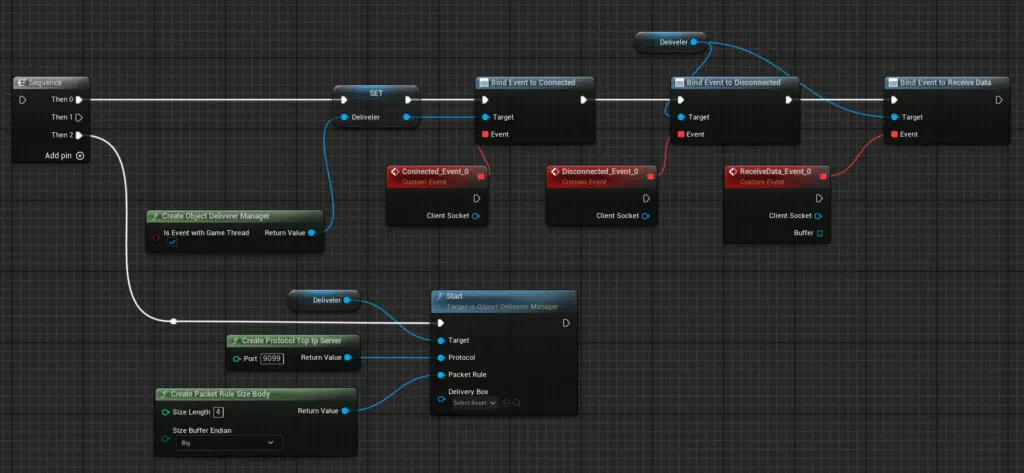
The following is a basic implementation example of creating a TCP server using ObjectDeliverer.
Blueprint
C++
void UMyClass::Start()
{
    auto deliverer = UObjectDelivererManager::CreateObjectDelivererManager();

    // Set up event handlers
    deliverer->Connected.AddDynamic(this, &UMyClass::OnConnect);
    deliverer->Disconnected.AddDynamic(this, &UMyClass::OnDisConnect);
    deliverer->ReceiveData.AddDynamic(this, &UMyClass::OnReceive);

    // Start communication
    // Protocol: TCP/IP Server
    // Data division rule: Header(Size) + Body
    // Serialization method: Byte array
    deliverer->Start(UProtocolFactory::CreateProtocolTcpIpServer(9099),
                     UPacketRuleFactory::CreatePacketRuleSizeBody());
}

void UMyClass::OnConnect(UObjectDelivererProtocol* ClientSocket)
{
    // Send data
    TArray<uint8> buffer;
    deliverer->Send(buffer);
}

void UMyClass::OnDisConnect(UObjectDelivererProtocol* ClientSocket)
{
    // Handle disconnection
    UE_LOG(LogTemp, Log, TEXT("closed"));
}

void UMyClass::OnReceive(UObjectDelivererProtocol* ClientSocket, const TArray<uint8>& Buffer)
{
    // Handle received data
}
Switching Protocols
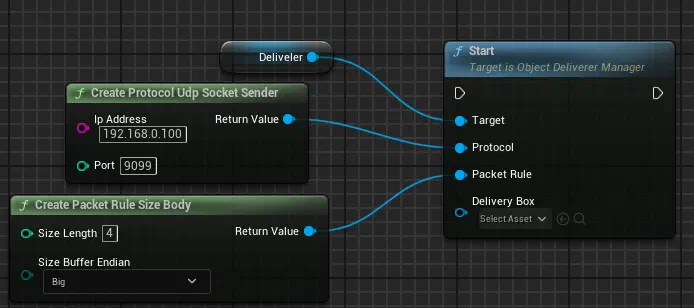
To change the protocol, simply pass a different protocol to the Start method. By making the following change to the above example, you can switch to the UDP transmission protocol.
Blueprint
C++
// UDP Sender
deliverer->Start(UProtocolFactory::CreateProtocolUdpSocketSender("192.168.0.100", 9099),
UPacketRuleFactory::CreatePacketRuleSizeBody());
ObjectDeliverer supports the following protocols. You can also create your own custom protocols.
- TCP/IP Server
- TCP/IP Client
- TCP/IP TLS Server (Available from v1.9.0 onwards)
- TCP/IP TLS Client (Available from v1.9.0 onwards)
- UDP Sender
- UDP Receiver
- WebSocket Client
- Shared Memory(Windows only)
- File writer
- File reader
- Reflection
TCP/IP Server, Client
This is a protocol for TCP/IP communication. Since TCP/IP supports one-to-many communication, multiple clients can connect to a single server.
Additionally, it features packet retransmission, so messages sent are reliably delivered to the recipient.
However, when multiple packets are sent, they may arrive combined or a single message may be split and delivered in parts. Therefore, it is recommended to use packet division rules other than Nodivision.
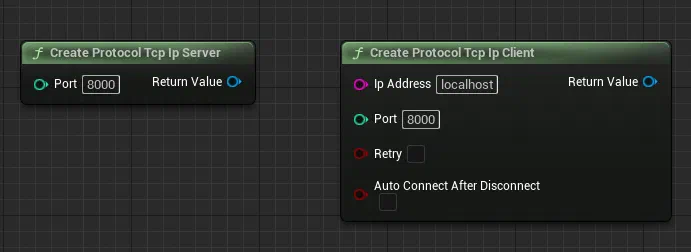
Create Protocol Tcp Ip Server
| Parameter | Description |
|---|---|
| Port | Port number for the server to listen on |
Create Protocol Tcp Ip Client
| Parameter | Description |
|---|---|
| IpAddress | IP address of the server |
| Port | Port number of the server |
| Retry | Automatically retry if connection fails |
| Auto Connect After Disconnect | Automatically attempt to reconnect when disconnected |
Features
| Feature | Description |
|---|---|
| Retransmission | Yes |
| Persistent Connection | Yes |
| Recommended Division Rules | FixedLength, Terminate, SizeBody (Nodivision is not suitable) |
| Reliability | High |
| Notes | Packets may arrive combined or split |
TCP/IP TLS Server, Client (Available from v1.9.0 onwards)
This is an encrypted communication protocol that adds TLS on top of TCP/IP. Like regular TCP/IP, it supports one-to-many communication (multiple clients can connect to one server), while also adding certificate-based authentication.
Depending on your needs, you can choose different security setups such as self-signed certificates + public key pinning, custom/private CA trust, or mutual TLS (mTLS).
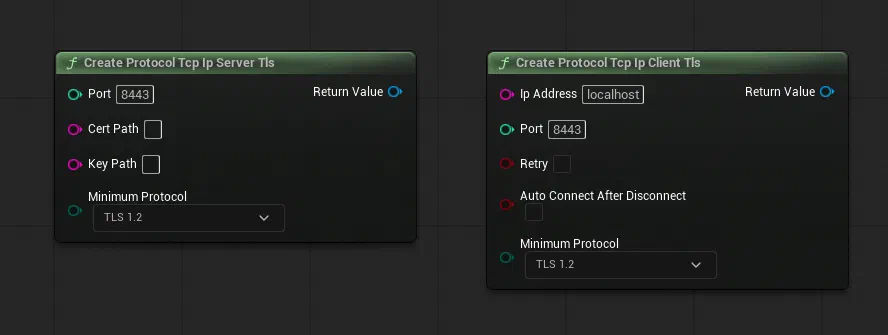
Create Protocol Tcp Ip Server Tls
| Parameter | Description |
|---|---|
| Port | Port number for the server to listen on |
| CertPath | Path to the server certificate file |
| KeyPath | Path to the server private key file |
| Minimum Protocol | Minimum TLS version to allow (higher versions are allowed) |
Create Protocol Tcp Ip Client Tls
| Parameter | Description |
|---|---|
| IpAddress | Hostname or IP address of the server |
| Port | Port number of the server |
| Retry | Automatically retry if connection fails |
| Auto Connect After Disconnect | Automatically attempt to reconnect when disconnected |
| Minimum Protocol | Minimum TLS version to allow (higher versions are allowed) |
Features
| Feature | Description |
|---|---|
| Retransmission | Yes |
| Persistent Connection | Yes |
| Recommended Division Rules | FixedLength, Terminate, SizeBody (Nodivision is not suitable) |
| Reliability | High |
| Notes | Required options differ by certificate setup (CA/self-signed/pinning/mTLS) |
For detailed TLS option selection by use case, see this page.
A TLSServer sample that can communicate with ObjectDeliverer TLSClient is published on GitHub and can be used as a reference.
Repository: AyumaxSoft/TLSServerSample
For manual certificate generation using OpenSSL commands, see this page.
UDP Sender, Receiver
This is a protocol for UDP communication. Unlike TCP/IP, UDP communication sends messages unilaterally to the recipient without a connection step.
Since it does not have packet retransmission functionality, there may be cases where packets are not delivered depending on network conditions. However, this also means it offers better performance compared to TCP/IP.
It is suitable for features such as sending state every tick, where occasional packet loss is acceptable.

Create Protocol Udp Socket Sender
| Parameter | Description |
|---|---|
| IpAddress | Destination IP address |
| Port | Destination port number |
Create Protocol Udp Socket Sender with Broadcast
| Parameter | Description |
|---|---|
| IpAddress | Destination IP address |
| Port | Destination port number |
| Enable Broadcast | Enable broadcast transmission |
Create Protocol Udp Socket Receiver
| Parameter | Description |
|---|---|
| Bound Port | Port number to listen for incoming data |
Features
| Feature | Description |
|---|---|
| Retransmission | No |
| Persistent Connection | No |
| Recommended Division Rules | Nodivision (Other rules are also OK) |
| Notes | Packets may be lost |
WebSocket Client (Available from v1.7.0 onwards)
This is a WebSocket client.
It can connect to WebSocket servers that are currently adopted in many web systems.
Encrypted communication is also possible using wss URLs.

Create Protocol Web Socket Client
| Parameter | Description |
|---|---|
| Url | WebSocket server URL (e.g., ws://localhost:8080) |
Create Protocol Web Socket Client with Protocols
| Parameter | Description |
|---|---|
| Url | WebSocket server URL |
| Protocols | List of sub-protocols |
Create Protocol Web Socket Client with Headers
| Parameter | Description |
|---|---|
| Url | WebSocket server URL |
| Protocols | List of sub-protocols |
| Headers | List of custom headers |
Features
| Feature | Description |
|---|---|
| Retransmission | Yes |
| Persistent Connection | Yes |
| Recommended Division Rules | Nodivision (Other rules are also OK) |
Shared Memory
Shared Memory creates a memory space that can be shared by multiple applications, allowing messages to be written to and read from this space.
Since it is not network communication, sending and receiving values is only possible on the same PC.
Additionally, there is no way for the receiver to know when data has been sent (written), so the receiving side must periodically read the memory to check for new writes. ObjectDeliverer handles this process automatically, so users typically do not need to be concerned about it. However, if you are reading memory created by a third party, you should check what rules are used for reading.
While Shared Memory can only be used on the same PC (which is a disadvantage), it offers superior read/write speed compared to other methods, making it suitable for exchanging large messages.
Currently, this protocol is only available on Windows.
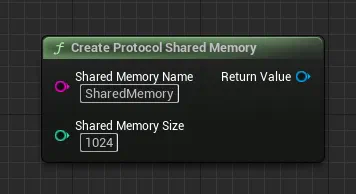
Create Protocol Shared Memory
| Parameter | Description |
|---|---|
| Shared Memory Name | Identifier name for the shared memory |
| Shared Memory Size | Size of shared memory in bytes |
Features
| Feature | Description |
|---|---|
| Retransmission | No |
| Persistent Connection | No |
| Recommended Division Rules | FixedLength, Terminate, SizeBody (Nodivision is not suitable) |
| Notes | Windows only |
| Notes | Receiver needs to poll, so sent values may be skipped |
File writer, reader
File is a protocol for writing and reading messages to and from a specific file.
Its behavior is similar to Shared Memory, but since it writes to an actual file, messages can be checked even after the application has closed.
Therefore, it is suitable for use cases where you need to store some kind of data.
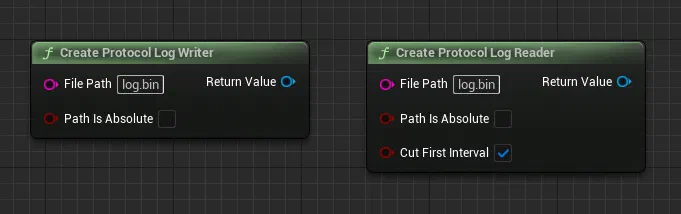
Create Protocol Log Writer
| Parameter | Description |
|---|---|
| File Path | File path to write to |
| Path Is Absolute | Whether the file path is absolute |
Create Protocol Log Reader
| Parameter | Description |
|---|---|
| File Path | File path to read from |
| Path Is Absolute | Whether the file path is absolute |
| Cut First Interval | Whether to skip the first read interval |
Features
| Feature | Description |
|---|---|
| Retransmission | No |
| Persistent Connection | No |
| Recommended Division Rules | FixedLength, Terminate, SizeBody (Nodivision is not suitable) |
| Notes | Receiver needs to poll, so sent values may be skipped |
Reflection
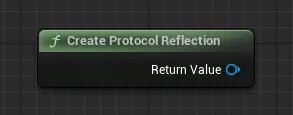
This is a protocol that performs message sending and receiving on itself. When a message is sent, a receive event occurs on the same instance. Therefore, it cannot be used to exchange messages with other instances.
It is mainly intended for debugging purposes during development.
| Feature | Description |
|---|---|
| Retransmission | No |
| Persistent Connection | No |
| Recommended Division Rules | Any |
| Notes | For debugging |
Switching Packet Fragmentation Rules
Protocols such as TCP/IP may split a single message into multiple packets or, conversely, combine multiple messages into a single packet.
To address this, ObjectDeliverer allows you to configure packet fragmentation rules to solve this problem.
Just like switching protocols, you can specify the packet fragmentation rule by passing it to the Start method.
Blueprint
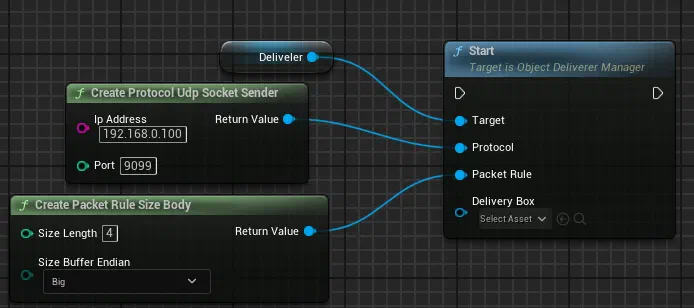
C++
// UDP Sender
deliverer->Start(UProtocolFactory::CreateProtocolUdpSocketSender("192.168.0.100", 9099),
UPacketRuleFactory::CreatePacketRuleSizeBody());
ObjectDeliverer supports the following fragmentation rules. You can also create your own custom rules.
- FixedLength
- Terminate
- SizeBody
- Nodivision
Both the sender and receiver must use the same fragmentation rule.
Therefore, if you need to communicate with a program created by a third party, you should check in advance which fragmentation rule it uses.
FixedLength
FixedLength is a method of splitting messages by setting a fixed length for each message. Since the packet size is fixed for every transmission, the splitting logic becomes simple. However, there is a limitation: messages larger than the specified size cannot be sent.
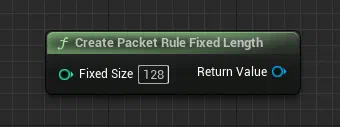
Create Packet Rule Fixed Length
| Parameter | Description |
|---|---|
| Fixed Size | Fixed packet size in bytes |
Terminate
Terminate is a method of delimiting messages by specifying a particular value as the separator. A commonly used example of this is using a newline character to separate messages. With this method, the length of messages sent can be changed dynamically, but since the end value must be searched for each time, performance is slightly reduced.
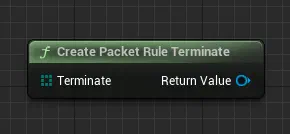
Create Packet Rule Terminate
| Parameter | Description |
|---|---|
| Terminate | Terminator string (delimiter) |
SizeBody
SizeBody is a method where the message size is embedded at the beginning of the message. This approach allows the message size to be dynamic, and since the logic for splitting packets is relatively simple, it also offers good performance.
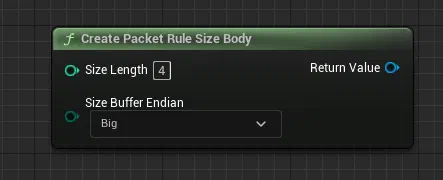
Create Packet Rule Size Body
| Parameter | Description |
|---|---|
| Size Length | Number of bytes for size information (1, 2, 4, 8) |
| Size Buffer Endian | Endianness (Big or Little) |
Nodivision
Nodivision treats each received packet as a single message without splitting or combining packets.
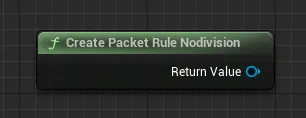
Create Packet Rule Nodivision
| Parameter | Description |
|---|---|
| None | This rule has no parameters |
Switching DeliveryBox
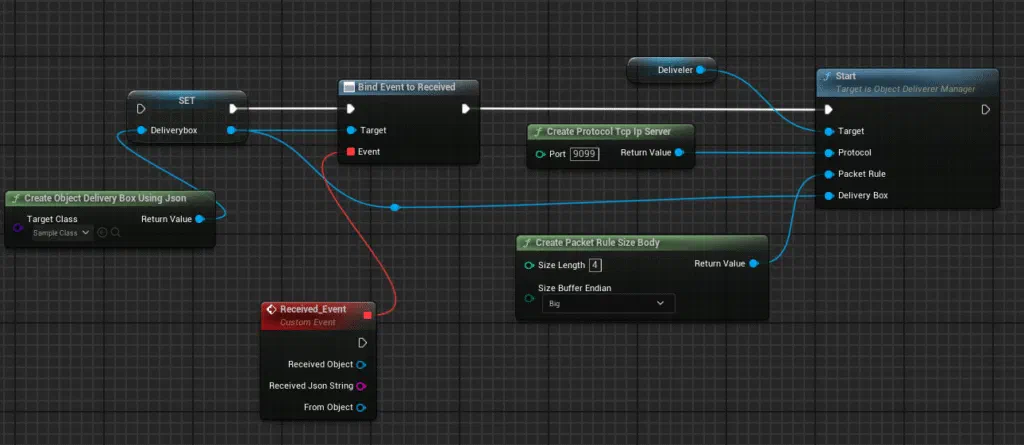
By default, ObjectDeliverer sends and receives byte arrays, but it can convert these to data in a specified format.
By using this feature, you no longer need to manually convert data to a byte array each time.
Note
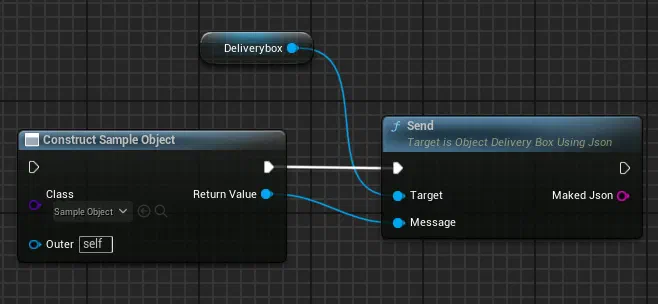
When using DeliveryBox, please note that message sending and receiving are performed via DeliveryBox, not through ObjectDelivererManager.
Blueprint
C++
auto deliverybox = UDeliveryBoxFactory::CreateObjectDeliveryBoxUsingJson(SampleObject::StaticClass());
deliverybox->Received.AddDynamic(this, &UMyClass::OnReceiveObject);

deliverer->Start(UProtocolFactory::CreateProtocolTcpIpServer(9099),
UPacketRuleFactory::CreatePacketRuleSizeBody(), deliverybox);
Blueprint
C++
auto message = NewObject<SampleMessage>();
deliveryBox->Send(message);
ObjectDeliverer supports the following DeliveryBoxes. You can also create your own custom DeliveryBox.
- ObjectDeliveryBoxUsingJson
- Utf8StringDeliveryBox
ObjectDeliveryBoxUsingJson
ObjectDeliveryBoxUsingJson is a DeliveryBox that converts any user-defined UObject class to and from a JSON string for sending and receiving.
Since all classes that can be used in Unreal Engine inherit from UObject, many class instances can be sent and received as they are.
Exchanging communication messages in JSON format is a common approach in other programming languages as well, so by using this, it is also possible to send and receive messages with other applications.
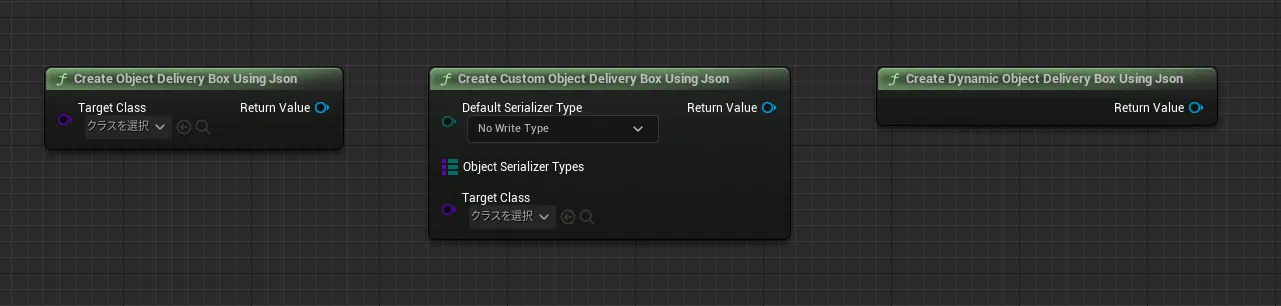
For more details about this DeliveryBox, please refer here.
Utf8StringDeliveryBox
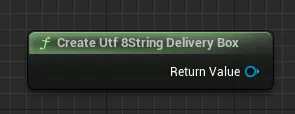
Utf8StringDeliveryBox is a DeliveryBox for sending and receiving arbitrary strings as they are. Encoding is performed using UTF-8.
Pre-Purchase Verification
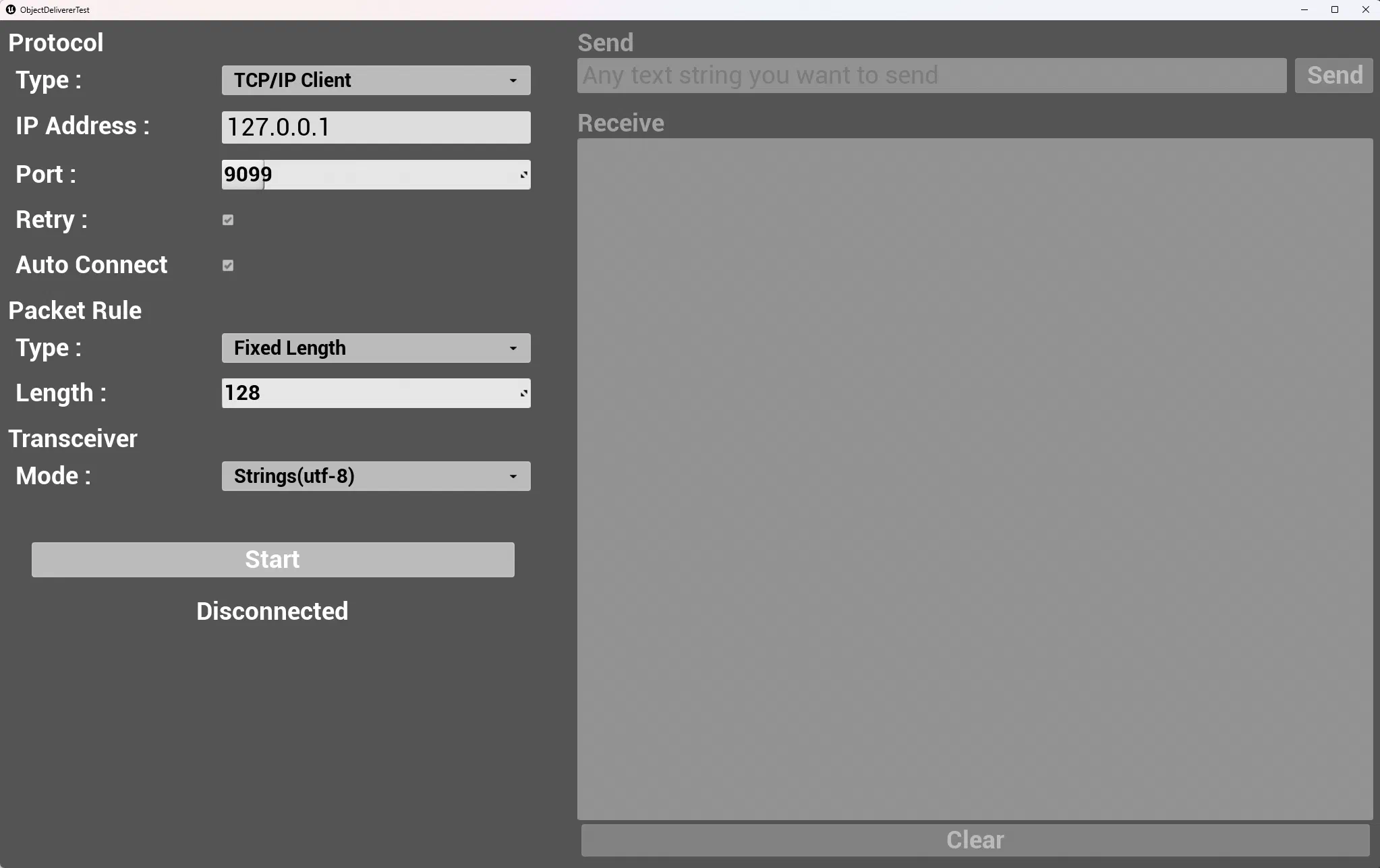
Network communication requires both the sender and receiver to communicate using the same rules.
If the rules don’t match, communication will not work properly.
That’s why we’ve prepared a Tester application that allows you to test ObjectDeliverer’s communication before purchasing the plugin.
This Tester application allows you to try many of ObjectDeliverer’s features. (Some features are not yet implemented.)
Use this to verify whether ObjectDeliverer can communicate with the applications or devices you want to connect to UnrealEngine.
Since this application is built using ObjectDeliverer, if this application can communicate successfully, there’s a high possibility that ObjectDeliverer will also be able to communicate.
You can download the tester app from this page.
Additionally, this app is implemented entirely in Blueprint, and these blueprints are included in the plugin, so you can review them after purchase.
Sample Implementation
Starting from v1.8.0, the plugin includes implementation samples for each communication protocol.
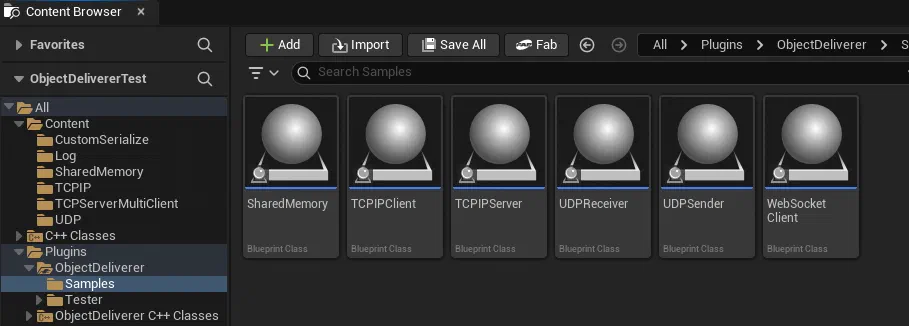
Each sample provides one Actor for each protocol, containing working blueprints that actually function.
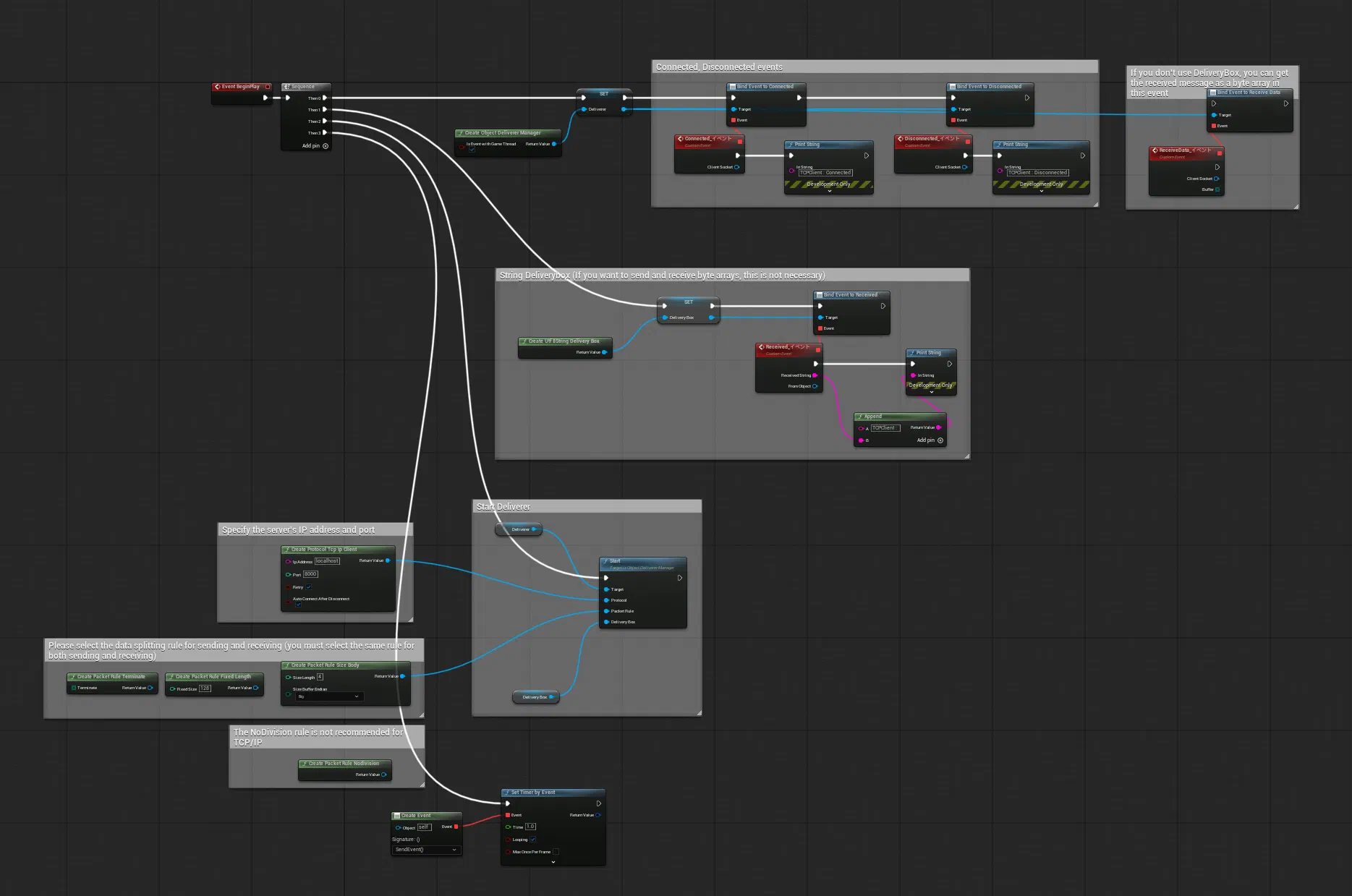
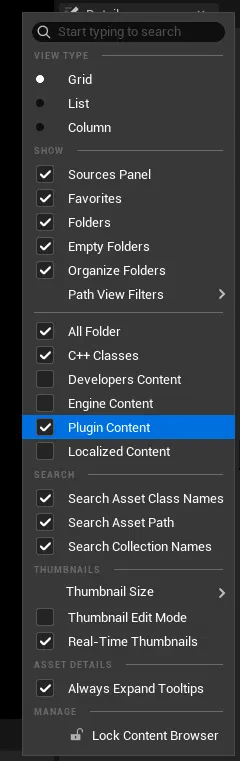
To view the samples included in the plugin, enable “Plugin Content” in the Content Browser settings in the editor.
FAQ
You can check frequently asked questions here.
Please Leave a Review
Thank you for using this plugin! Your review on the Epic Games Fab store is a great encouragement for future development. We'd love to hear your feedback!
Write a Review on Fab