Table of Contents
A high-performance plugin that provides intuitive JSON access using dot notation along with powerful write capabilities.
Overview
EasyJsonParser V2 is a powerful plugin that revolutionizes JSON processing in Unreal Engine. In game development, handling JSON format data is essential for reading configuration files, managing save data, API communication, and dynamic content delivery. This plugin makes these tasks remarkably simple and significantly improves development efficiency.
Why Choose EasyJsonParser V2
Traditional JSON processing in Unreal Engine required complex APIs and cumbersome error handling. EasyJsonParser V2 was designed to solve these problems:
- Intuitive Access Method: Easy access to nested data using dot notation like
player.stats.level - Type-Safe Operations: Dedicated methods for each data type prevent runtime errors
- High Performance: Lightweight implementation based on USTRUCT significantly reduces memory usage
- Full Blueprint Support: All features available from Blueprint without C++ knowledge
For V1 Users: This plugin includes both V1 and V2 modules, so you can use whichever you prefer. For V1 usage instructions, please see here.
What’s New in Version 2.0
Performance Improvements
Adoption of Lightweight Architecture V2 has been redesigned from UObject-based to USTRUCT-based implementation. This results in:
- Significant reduction in memory usage
- Minimal garbage collection (GC) overhead
- Greatly improved performance when handling large amounts of JSON objects
New Features in Detail
Complete Write Functionality V2 enables not only reading but also creation and editing of JSON:
- Create new JSON documents
- Edit and update existing JSON
- Build dynamic data structures
- Generate save data in-game
Multi-dimensional Array Support Access multi-dimensional arrays with dot notation:
- Intuitive access like
gameBoard[0][1] - Read/write nested array structures
Advanced Debug Mode Debug features that improve development efficiency:
- Debug log level settings
- Precise error location identification
Automatic Path Creation Convenient feature that accelerates development:
// Intermediate objects are automatically created
NewJson.WriteString("deeply.nested.path.to.value", "data");
// Result: {"deeply": {"nested": {"path": {"to": {"value": "data"}}}}}
Unreal Engine Compatibility
Unreal Engine compatibility for each EasyJsonParser V2 version is listed below.
| Plugin Version | Supported UE Versions |
|---|---|
| v2.0.0 | UE5.5 - 5.8 |
Basic Usage
Loading JSON
Load from String
Create a JsonObject from a JSON string.
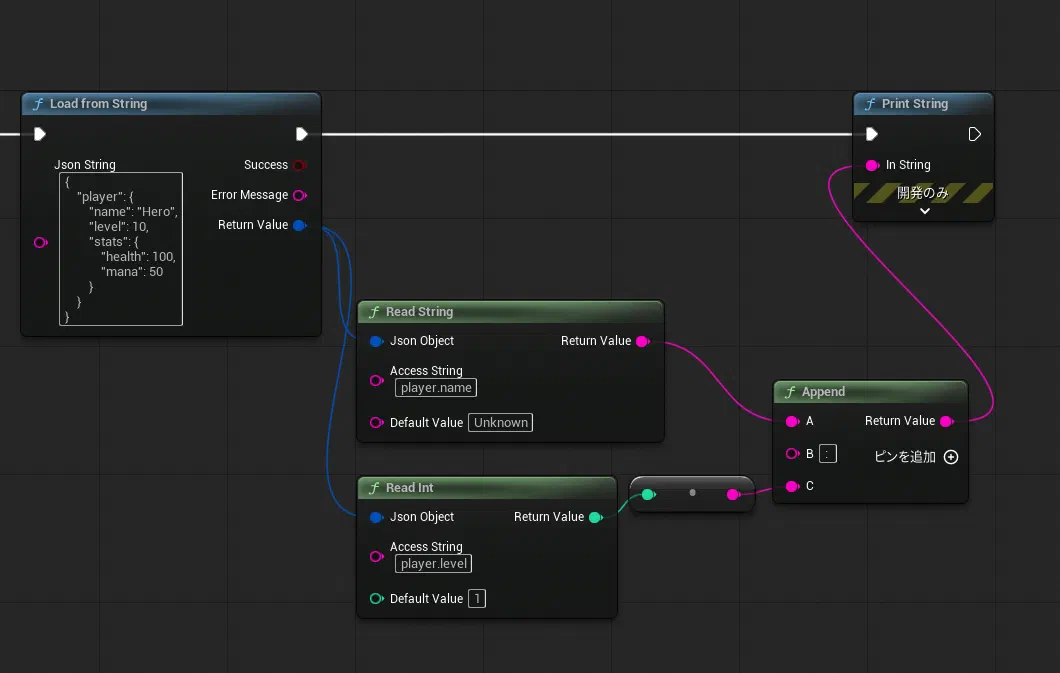
// C++ Usage Example
FString JsonString = TEXT(R"({
    "player": {
        "name": "Hero",
        "level": 10,
        "stats": {
            "health": 100,
            "mana": 50
        }
    }
})");

bool bSuccess;
FString ErrorMessage;
FEasyJsonObjectV2 JsonObject = UEasyJsonParserV2BlueprintLibrary::LoadJsonFromString(JsonString, bSuccess, ErrorMessage);

if (bSuccess)
{
    // Read data
    FString PlayerName = JsonObject.ReadString("player.name", "Unknown");
    int32 PlayerLevel = JsonObject.ReadInt("player.level", 1);
}
Load from File
Load a file containing a JSON string to create a JsonObject.
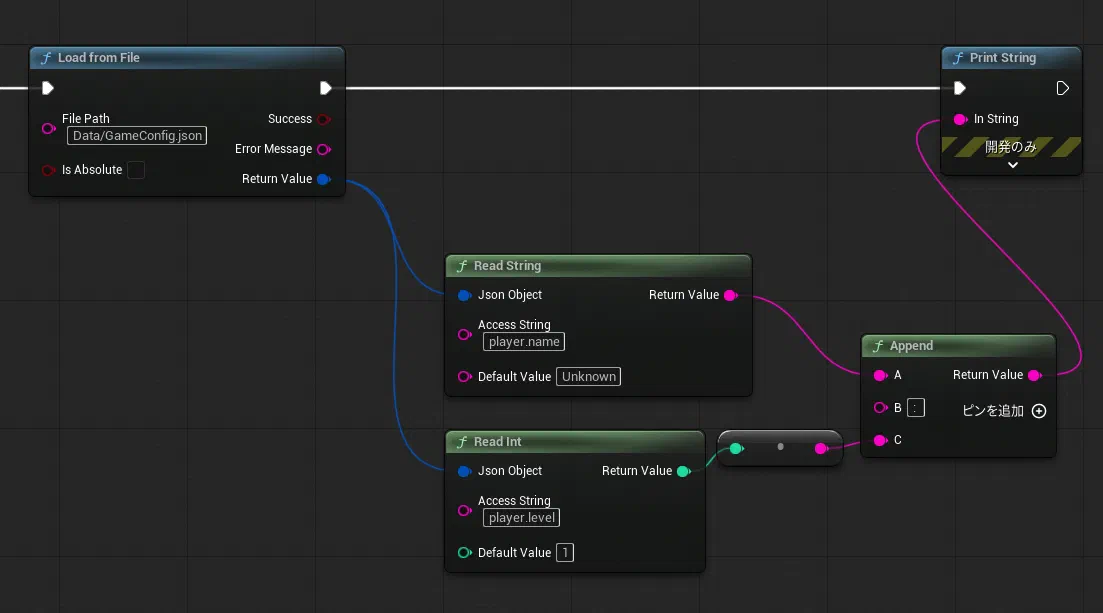
// Load from file
FString FilePath = TEXT("Data/GameConfig.json");
bool bAbsolutePath = false;
bool bSuccess;
FString ErrorMessage;

FEasyJsonObjectV2 JsonObject = UEasyJsonParserV2BlueprintLibrary::LoadJsonFromFile(FilePath, bAbsolutePath, bSuccess, ErrorMessage);

if (!bSuccess)
{
    UE_LOG(LogTemp, Error, TEXT("Failed to load JSON: %s"), *ErrorMessage);
}
Reading Values
Reading Basic Types
Get values directly by specifying access strings that connect JSON hierarchy with dots.
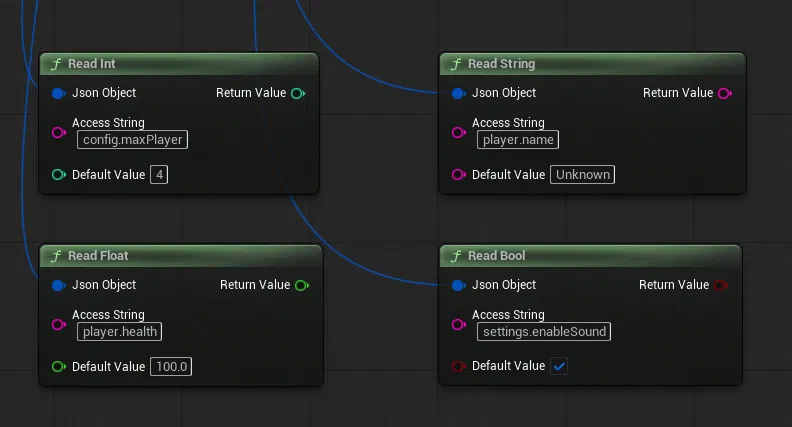
// Integer
int32 MaxPlayers = JsonObject.ReadInt("config.maxPlayers", 4);

// Float
float PlayerHealth = JsonObject.ReadFloat("player.health", 100.0f);

// String
FString PlayerName = JsonObject.ReadString("player.name", "Unknown");

// Boolean
bool EnableSound = JsonObject.ReadBool("settings.enableSound", true);
Reading Objects
Methods for retrieving intermediate objects when JSON has a multi-level structure.
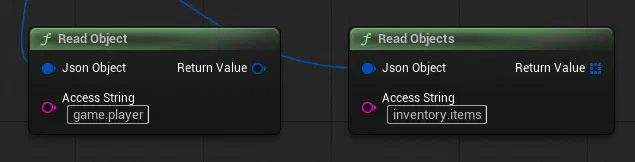
// Single object
FEasyJsonObjectV2 PlayerData = JsonObject.ReadObject("game.player");

// Array of objects
TArray<FEasyJsonObjectV2> Items = JsonObject.ReadObjects("inventory.items");
Writing Values (New in V2)
Creating New JSON
Generate empty JSON and add values to create JSON objects.
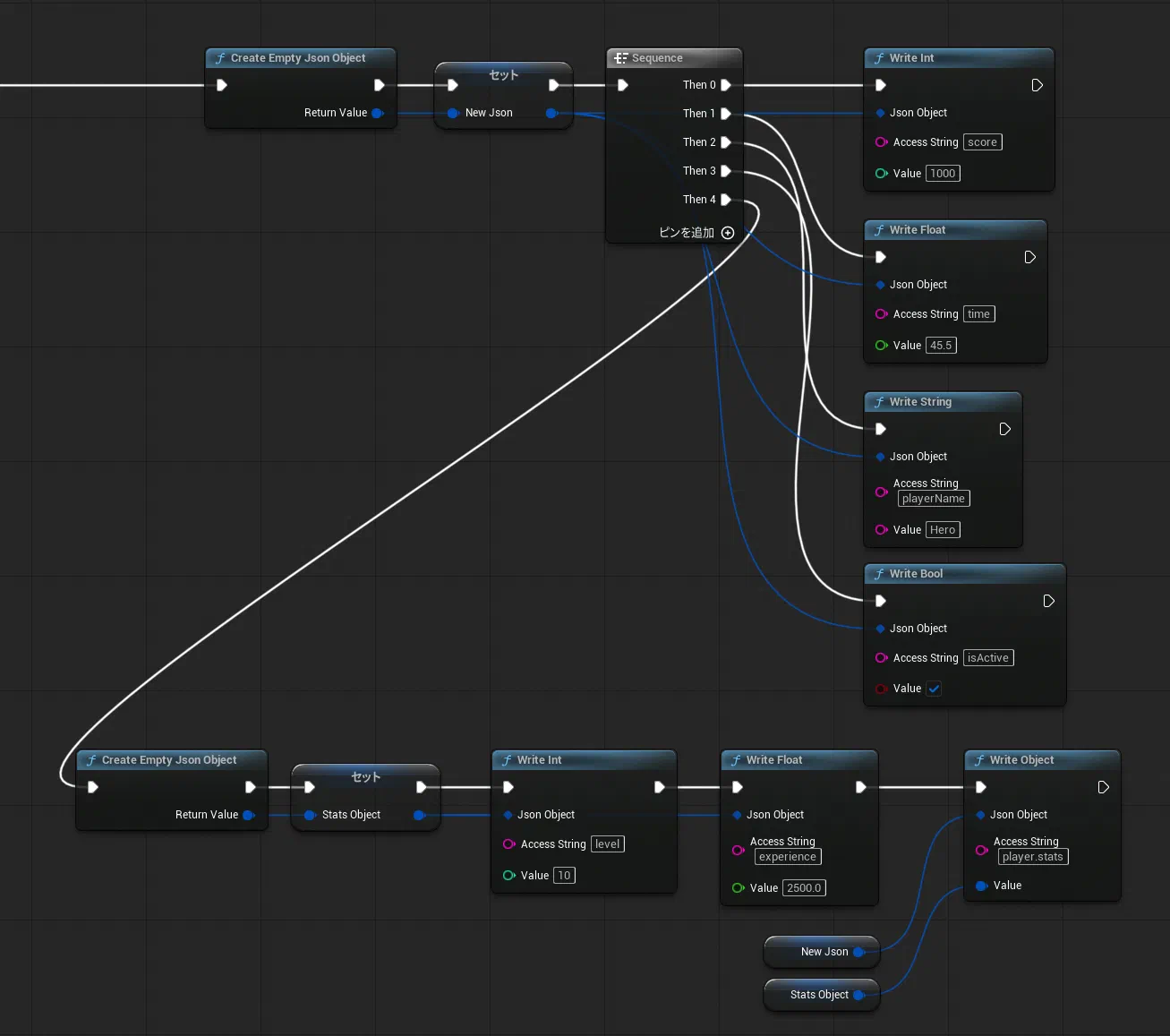
// Create empty JSON object
FEasyJsonObjectV2 NewJson = UEasyJsonParserV2BlueprintLibrary::CreateEmptyJsonObject();

// Write basic values
NewJson.WriteInt("score", 1000);
NewJson.WriteFloat("time", 45.5f);
NewJson.WriteString("playerName", "Hero");
NewJson.WriteBool("isActive", true);

// Write objects
FEasyJsonObjectV2 StatsObject = UEasyJsonParserV2BlueprintLibrary::CreateEmptyJsonObject();
StatsObject.WriteInt("level", 10);
StatsObject.WriteFloat("experience", 2500.0f);
NewJson.WriteObject("player.stats", StatsObject);
Generated Json
{
    "score": 1000,
    "time": 45.5,
    "playerName": "Hero",
    "isActive": true,
    "player":
    {
        "stats":
        {
            "level": 10,
            "experience": 2500
        }
    }
}
Adding to Arrays
You can also add array elements to JSON.
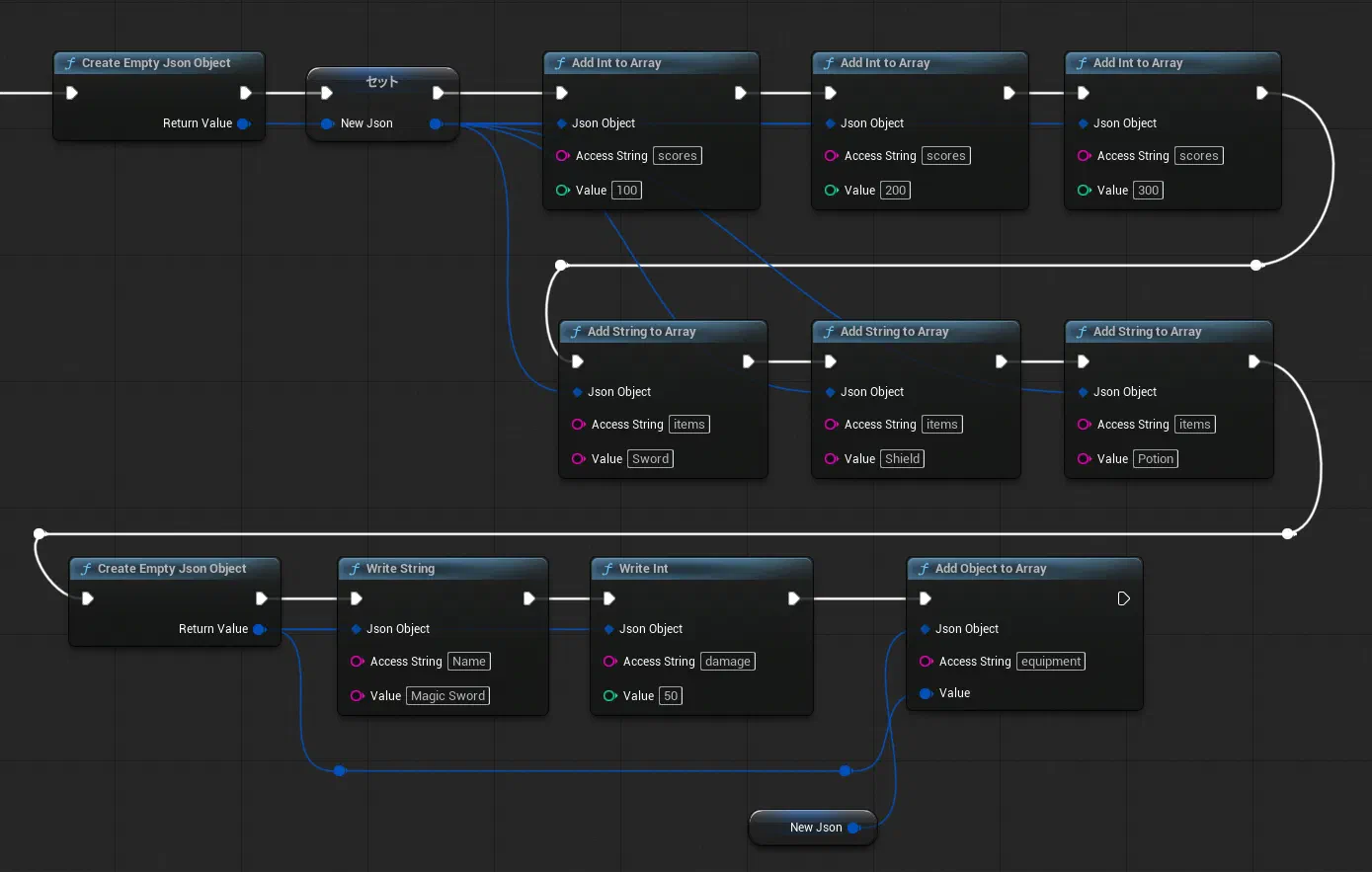
// Add values to arrays
NewJson.AddIntToArray("scores", 100);
NewJson.AddIntToArray("scores", 200);
NewJson.AddIntToArray("scores", 300);

NewJson.AddStringToArray("items", "Sword");
NewJson.AddStringToArray("items", "Shield");
NewJson.AddStringToArray("items", "Potion");

// Add objects to array
FEasyJsonObjectV2 ItemObject = UEasyJsonParserV2BlueprintLibrary::CreateEmptyJsonObject();
ItemObject.WriteString("name", "Magic Sword");
ItemObject.WriteInt("damage", 50);
NewJson.AddObjectToArray("equipment", ItemObject);
Generated Json
{
    "scores": [ 100, 200, 300 ],
    "items": [
        "Sword",
        "Shield",
        "Potion"
    ],
    "equipment": [
        {
            "Name": "Magic Sword",
            "damage": 50
        }
    ]
}
Saving JSON
Save to File
Created JSON objects can be saved to files.
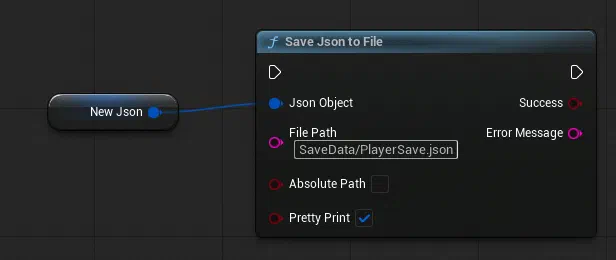
FString FilePath = TEXT("SaveData/PlayerSave.json");
bool bAbsolutePath = false;
bool bPrettyPrint = true;
bool bSuccess;
FString ErrorMessage;

UEasyJsonParserV2BlueprintLibrary::SaveJsonToFile(JsonObject, FilePath, bAbsolutePath, bPrettyPrint, bSuccess, ErrorMessage);

if (bSuccess)
{
    UE_LOG(LogTemp, Log, TEXT("Save successful"));
}
else
{
    UE_LOG(LogTemp, Error, TEXT("Save failed: %s"), *ErrorMessage);
}
Get as String
You can also convert created JSON objects to string format.
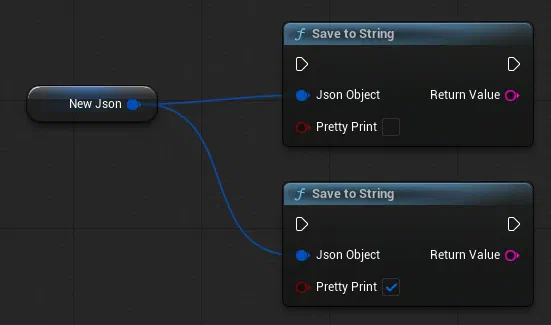
// Compact JSON string
FString JsonString = UEasyJsonParserV2BlueprintLibrary::JsonToString(JsonObject, false);

// Pretty-printed JSON string
FString PrettyJsonString = UEasyJsonParserV2BlueprintLibrary::JsonToString(JsonObject, true);
Debug Features
When debug mode is ON, EasyJsonParser V2 operation logs are output to the log.
This is useful for finding causes when something doesn’t work as intended.
However, it can cause performance degradation, so we recommend disabling it in release builds.
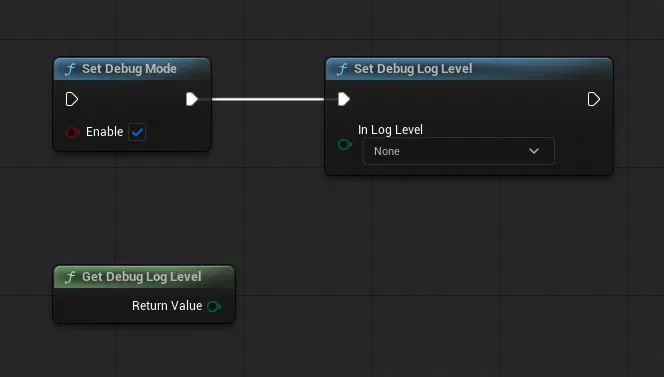
// Enable debug mode
UEasyJsonParserV2BlueprintLibrary::SetDebugMode(true);

// Set debug log level
UEasyJsonParserV2BlueprintLibrary::SetDebugLogLevel(EEasyJsonParserV2DebugLogLevel::Detailed);

// Get current log level
EEasyJsonParserV2DebugLogLevel CurrentLevel = UEasyJsonParserV2BlueprintLibrary::GetDebugLogLevel();
Utility Functions
Other convenient functions are available.
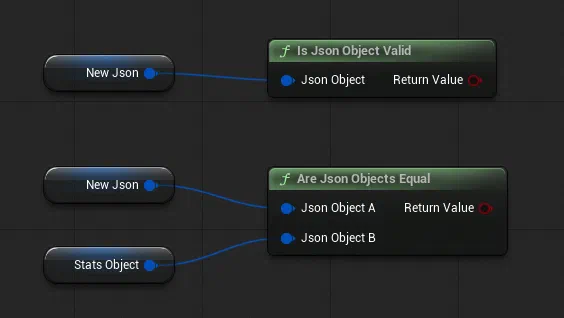
// Check JSON object validity
bool bIsValid = UEasyJsonParserV2BlueprintLibrary::IsJsonObjectValid(JsonObject);

// Compare two JSON objects
bool bAreEqual = UEasyJsonParserV2BlueprintLibrary::AreJsonObjectsEqual(JsonObjectA, JsonObjectB);
Full Feature List
All V2 features are available in both Blueprint and C++.
In Blueprint, the following nodes are available from the EasyJsonParserV2 category:
JSON Loading/Creation
- Load Json From File - Load JSON from file
- Load Json From String - Load JSON from string
- Create Empty Json Object - Create empty JSON object
Value Reading
- Read Int - Read integer value
- Read Float - Read float value
- Read String - Read string value
- Read Bool - Read boolean value
- Read Object - Read object
- Read Objects - Read object array
Value Writing
- Write Int - Write integer value
- Write Float - Write float value
- Write String - Write string value
- Write Bool - Write boolean value
- Write Object - Write object
Array Operations
- Add Int To Array - Add integer to array
- Add Float To Array - Add float to array
- Add String To Array - Add string to array
- Add Bool To Array - Add boolean to array
- Add Object To Array - Add object to array
Save/Convert
- Save Json To File - Save JSON to file
- Json To String - Convert JSON to string
Utilities
- Is Json Object Valid - Check JSON object validity
- Are Json Objects Equal - Compare two JSON objects
Debug
- Set Debug Mode - Enable/disable debug mode
- Is Debug Mode - Get debug mode status
- Set Debug Log Level - Set debug log level
- Get Debug Log Level - Get current log level
Access String Specification
Basic Notation
Specify the path to the target value by connecting keys with dots.
Simple Case
{
  "prop": "abc"
}
Access string: prop
Hierarchical Object Structure
{
  "obj": {
    "prop": "abc"
  }
}
Access string: obj.prop
When Arrays are Included
{
  "obj": [
    {"prop": "abc"},
    {"prop": "def"}
  ]
}
Access strings:
- First element:
obj[0].prop - Second element:
obj[1].prop
Accessing Multi-dimensional Arrays
{
  "matrix": [
    [1, 2, 3],
    [4, 5, 6],
    [7, 8, 9]
  ]
}
Access patterns:
matrix[0][0]→ 1matrix[1][2]→ 6matrix[2][1]→ 8
Performance Comparison
| Feature | V1 | V2 |
|---|---|---|
| Memory Usage | High (UObject-based) | Low (USTRUCT-based) |
| GC Overhead | High | Minimal |
| JSON Writing | ❌ | ✅ |
| Debug Mode | Basic | Advanced |
| Blueprint Support | Full | Full |
FAQ
You can check frequently asked questions here.
Please Leave a Review
Thank you for using this plugin! Your review on the Epic Games Fab store is a great encouragement for future development. We'd love to hear your feedback!
Write a Review on Fab